How to tweek AI inline completion in latest version?

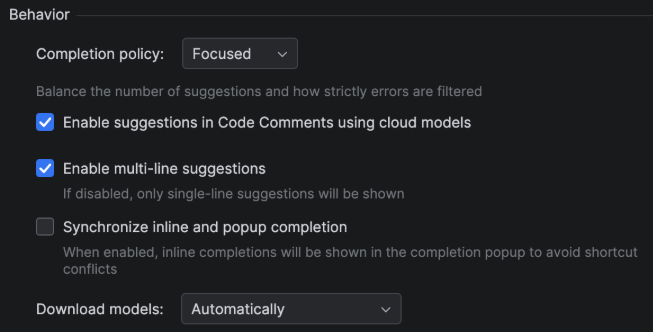
I recently updated to Intellij 2026.1.4 (pro version). Since then I get an annoying amount of AI inline suggestions and a lot of multi-line suggestions.
How can I turn multi-line suggestions off and reduce the amount of suggestions in general?
In previous versions it was possible to set it to Focused and disable multi-line suggestions:
Please sign in to leave a comment.
In the latest IntelliJ versions, AI inline completion is controlled through the AI Assistant settings rather than older modes. You can tweak behavior by going to Settings → Tools → AI Assistant → Inline Completion, where options let you disable multi‑line suggestions, adjust how often completions appear, and choose whether they trigger MN Unemployment automatically or only with shortcuts. This gives you finer control over suggestion density and style, so you can restore a leaner, less intrusive workflow.
Best regards,
Cassie Elks
Can you please provide a screenshot?
I can only see the multi-line option when configuring “Local” only, not when using Cloud completition.
And the “Completion policy” setting is only available for cloud completition and it doesn't have a “Focused” option anymore.
I am currently using "Local + Cloud" configuration and it's spamming me with unnecessary multi-line suggestions
JetBrains added separate controls for inline completion, multi-line suggestions, and next-edit suggestions in newer versions, so older settings like the previous “Focused + disable multi-line” option may have moved. www kpschedule com