Multiple carets in javadoc for IntelliJ IDEA 2026.2
Answered

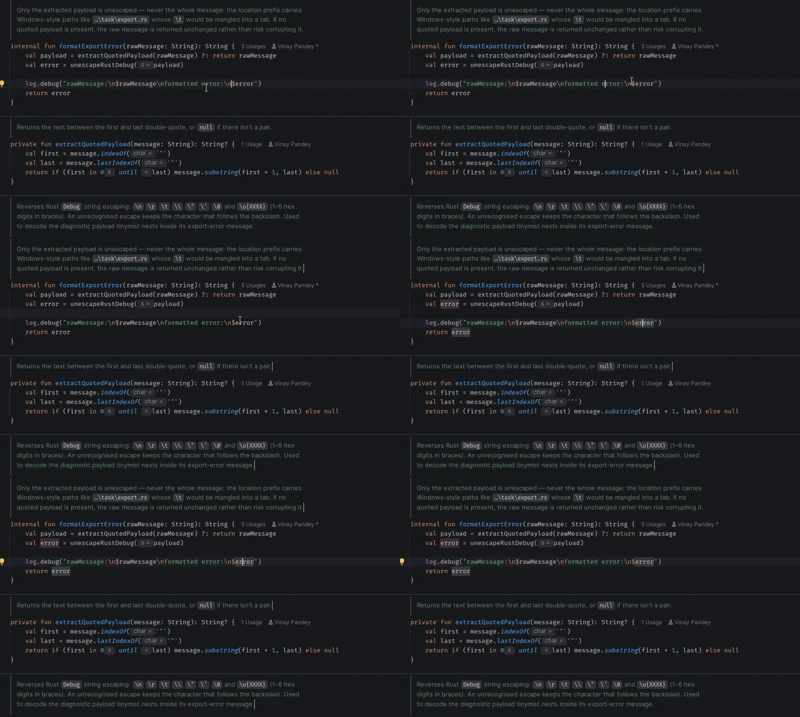
Ever since I updated to 2026.2 (I am currently on 2026.2.0.1 ultimate version) I have started seeing multiple cursors in the `javadoc` or `kotlin-doc` area. This is so confusing for me since it takes me a while to find where my real cursor is. I have not modified any setting since the older version.
How can I turn it off?
Please sign in to leave a comment.
Hi Vinay Pandey, this appears to be a known issue tracked under IJPL-248084.
Could you please confirm whether the following settings are enabled?
If both are enabled, could you let me know whether disabling either of them makes the issue disappear?
Yes, I can confirm that the issue goes away when I either disable screen readers or disable rendering of documentation comments. I have, for now, disabled screen readers.
Vinay Pandey, thanks for confirming! Please consider following IJPL-248084 to stay informed about any updates or progress on the issue.