Pycharm freezes when indexing after upgrade to 2021.1

After updating to the latest pycharm version (2021.1.3) from 2020.3, it froze when opening a previous project and indexing dependencies. I had to force close it with task manager as it was completely unresponsive. I deleted the recentProjects file so that I could try a different project, and create a new project with a new virtualenv but ran into the same issue. I then uninstalled and reinstalled, but ran into the same issue (perhaps the old installations are still affecting it?)
Issue is on Windows 10. I uploaded the logs I could find. There were some thread dump files which seemed to reference getting locked.
Upload id: 2021_07_07_MBCE9nqqC2wGT938 (files: idea.log and 19 more)
Please sign in to leave a comment.
Hello,
I am wondering if there is a third-party application like AV which might affect the IDE installation files?
Please try installing the EAP version https://www.jetbrains.com/pycharm/nextversion/ , beforehand, please delete all IDE related files https://www.jetbrains.com/help/pycharm/directories-used-by-the-ide-to-store-settings-caches-plugins-and-logs.html
Let me know how it goes.
I ended up being able to get version 2021.1.3 working but I had to deleted my previous configuration that was stored in my user directory and reinstall. The path was %USERPROFILE%\.PyCharm2019.2. After it installed successfully I just manually added back custom settings, plugins, shortcuts, etc.
I had previously tried deleting all IDE related files as given by that link with no success. The above folder seemed to be the key difference.
Same for me, but I also had to delete the folder ~\.local\JetBrains\PyCharmCE2021.3. It's amazing this is still uncorrected, 5 months later.
recently i had same issue with 2022.1 (and also before), with the same symptoms. PyCharm freezes on indexing for python projects. Sometimes just before freeze a popup with missing language warning shows up: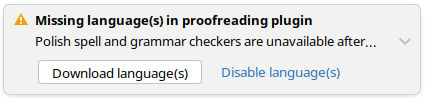
but at this point there is no way to make any action because of IDE freeze.
My way to avoid problem without loosing settings:
1. rename current project folder, so PyCharm can't open this project and won't start indexing.
2. create new non-python project (bootstrap for my case)
3. wait for missing language popup. Click download language(s)
4. restore original folder name for project from step 1
after that everything works like a charm ; )