Interpreter configuration missing stdlib...

OK I don't know what broke for me but a setup I've been using at work for a while has just stopped altogether.
My interpreters which are based off of venv's are missing code completion for portions of the standard lib, but the Python Console works fine.
First, the problem:

Autocomplete naturally is broken, and I'm missing a variety of modules but not all (as you can see here).
If I use the Python Console, autocompletion is fine:

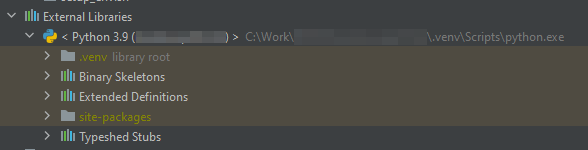
What I noticed in the broken setup is that in the "External Libraries" I'm missing entries. Here is the broken interpreter:
And here is another project that works fine:
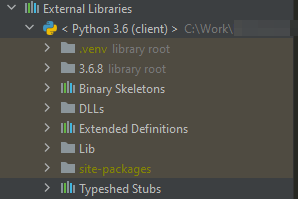
Here 3.6.8 is the directory on disk that contains the Python installation, there is no analog to that, DLLs or Lib in the broken interpreter.
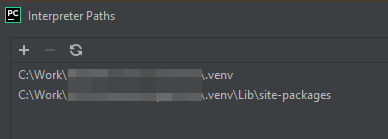
Broken interpreter settings Paths window:
Good interpreter Paths window:
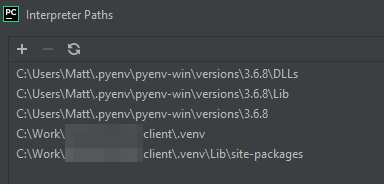
If I manually add the three paths to the interpreter paths, nothing gets fixed, it is still broken.
In the project where things are broken, the base Python interpreter is in a `_deps/python` directory (so the structure is PROJECT_ROOT/_deps/python/python.exe for example).
The virtual env is in PROJECT_ROOT/.venv
_deps/ is in my .gitignore if that matters at all.
Does anyone have any idea what to do?
PyCharm 2021.2.1 (Professional Edition)
Build #PY-212.5080.64, built on August 25, 2021
Licensed to <cut>
Subscription is active until January 23, 2022.
Runtime version: 11.0.11+9-b1504.16 amd64
VM: OpenJDK 64-Bit Server VM by JetBrains s.r.o.
Windows 10 10.0
GC: ParNew, ConcurrentMarkSweep
Memory: 1979M
Cores: 16
Non-Bundled Plugins: com.intellij.plugins.visualstudiokeymap (212.4746.57), CMD Support (1.0.5), org.toml.lang (0.2.154.4085-212), com.koxudaxi.pydantic (0.3.5), ru.meanmail.plugin.requirements (2021.4.1-212)
Please sign in to leave a comment.
It seems to randomly add the 3 missing paths to my "Source Folders" in the project structure, but this doesn't end up working correctly either (most of the binary symbol detection fails completely in the ssl library for example):
Those are the ones I guess my other venvs that get added just magically work...
OK, some progress. I have found that if I move the base Python installation _out of the project root_ (so not in the _deps folder), the interpreter gets added like it should! A small head scratcher as I've been using this pattern for projects for quite some time now. Is this officially breaking things?
I have narrowed it down to when the base interpreter resides in the project directory tree then everything goes to shit.
My process of elimination was:
So if I:
I don't know how this worked for me before, I even downloaded 2021.1 to see if I was losing my mind, but all the behaviour above continues to be as broken as in 2021.2.
EDIT: Spoke too soon. After another restart of Pycharm it updated the paths in the jdk.table.xml and all the completion is broken again.
Last update from me.
These are the lines that break everything. I noticed this when upgrading back to 2021.2.1 and then autocompletion was broken. I saw I had committed this change while tracking the project some point after my original upgrade to 2021.2.1.
If I revert these changes that 2021.2.1 creates automatically when creating the interpreter for the venv (while PyCharm is closed), everything works perfectly in 2021.2.1. 2021.1 did not cause this change, seems like a regression.