Intellij Community 2020.2.1 not launching in windows 2019 server machine
Answered

When I try to launch the idea64.exe, exe pops up in the task manager just a second and gone. no errors or splash screen. But, when I try to launch using idea.bat file, it works fine; and seeing these details.
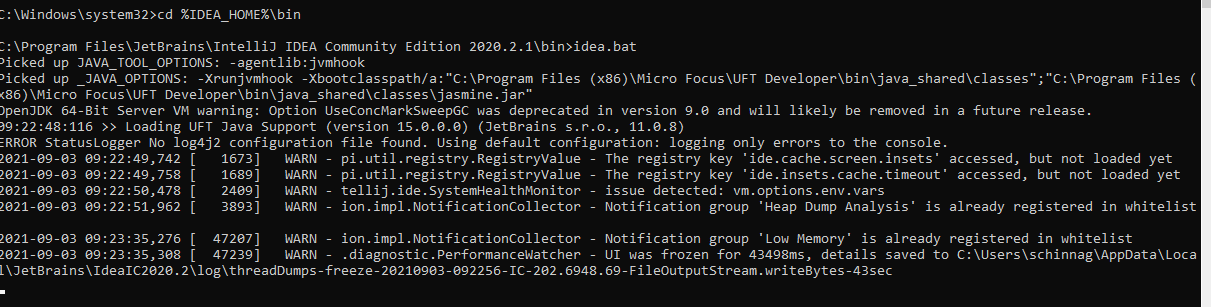
And, I have the idea64.exe.vmoptions file in the <installtion folder>\bin directory
-Xms128m
-Xmx750m
-XX:ReservedCodeCacheSize=240m
-XX:+UseConcMarkSweepGC
-XX:SoftRefLRUPolicyMSPerMB=50
-ea
-XX:CICompilerCount=2
-Dsun.io.useCanonPrefixCache=false
-Djdk.http.auth.tunneling.disabledSchemes=""
-XX:+HeapDumpOnOutOfMemoryError
-XX:-OmitStackTraceInFastThrow
-Djdk.attach.allowAttachSelf=true
-Dkotlinx.coroutines.debug=off
-Djdk.module.illegalAccess.silent=true
Any help would be appreciated.
Please sign in to leave a comment.
Are there any errors/warnings in Windows event log for this time when process crashes?
Please try with antivirus/firewall disabled or make sure that IDE settings directories, IDE installation home and IDE executable are excluded from the scan.
Yes, I have deleted all the directories from my earlier version, and installed this one. Also, I do not see any event logs for this when I launch. Not sure what's going on.
Such issue could likely be caused by AV/firewall. Have you tried the suggestion about excluding or disabling it?
For example DGAgent security software is known to cause problems:
Try also re-installing into new empty directory from scratch.
If issue remains
>Also, I do not see any event logs for this when I launch.
What records are there around the time when you launch IDE.
Are there any
java_error_in_*.logfiles from the user profile (home) folder? Please provide if any. You can also include them from Help | Collect Logs and Diagnostic Data action.For uploading you can use https://uploads.jetbrains.com or any file sharing service.