IDEA text encoding bugs
Answered

Hi,
My friend who uses eclipse sent me a file. I opened the file and took a look at it. Inside it looks like this:

It looks identical in eclipse too.
Then when I build it and examine it with luyten, this is what I see:

These weird encoding things create very strange output on a user's screen.
I can't get them to appear in GitHub, Eclipse or IDEA. They only show up when the project is built.
The string does not show up if the project is built using eclipse.
How do i get rid of them?
Please sign in to leave a comment.
Check the encodings, see https://blogs.jetbrains.com/idea/2013/03/use-the-utf-8-luke-file-encodings-in-intellij-idea/.
Found some more information. The § symbol (which precedes all of the strings) is  in another encoding. this character then translates into 00C2 in UTF-8. 00C2 is what is seen there.
Here: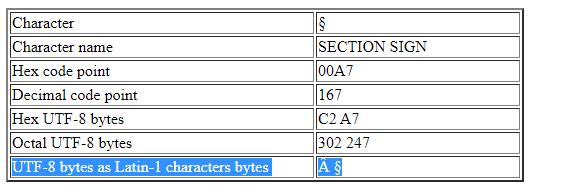
Still no idea how to fix this issue though.
I tried changing the encoding in IDEA to various options, but none of them seemed to do anything.
Please share a sample project that will reproduce the issue and provide the exact steps to see the problem: https://uploads.jetbrains.com.
upload id: 2021_09_08_TnQznkA9ugQesEZx
i'm using luyten to examine the finished JARs, link:
https://github.com/deathmarine/Luyten
Your project encoding is not set to UTF-8.
What do you expect to see in the class file instead?
Thanks for the quick reply.
The issue is not in the editor. The issue is that those unicode characters (\u00c2) appear when the project is built. I am building the project using a build artifact.
All I want is that the characters do not appear when I export the project.
Here is the sample project with UTF-8 encoding working correctly in IntelliJ IDEA: