Showing 2 maven projects in maven tool window after compile
Answered

If I do "maven clean", there's only one project, but after I do "maven compile"

In "Project View", it shows like this
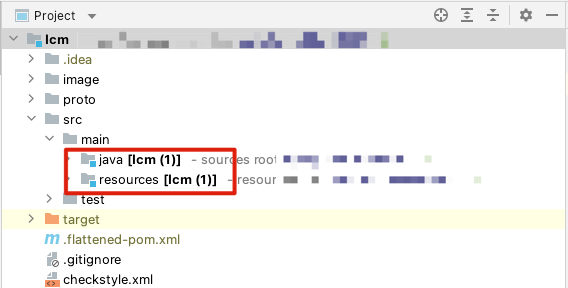
How can I get rid of them?
Please sign in to leave a comment.
In the Maven tool window please right click on the Maven project node and select 'Go to Source' action. Where does it navigate you to for both these modules?
Btw what IDE version do you use? A related issue: IDEA-195620 Importing a multi-module maven project with .flattened-pom.xml files results in duplicate modules has been fixed in latest versions.
If I "Jump to source" of the first maven project, it opens the ".flattened-pom.xml". The second goes to pom.xml.
My version is
Is it possible to get a project to check this? For uploading you can use https://uploads.jetbrains.com or any file sharing service. This uploads only accessible to IntelliJ IDEA developers.
As a workaround, please delete .flattened-pom.xml file or add this patter to the ignored list in Settings (Preferences on macOS) | Build, Execution, Deployment | Build Tools | Maven | Ignored Files.
Sorry, I can't upload the code. It's the company's property.
Added,
But still see 2 projects in maven tool window, however now, the first one is greyed out.
>But still see 2 projects in maven tool window, however now, the first one is greyed out.
But do you see new modules in Project tool window?
Btw, did you remove one Module from Maven tool window after adding it to ignored list but it still appears?
Do I understand correctly, that after mvn compile there is a .flattened-pom.xml file generated and the 2nd Maven module appears automatically in Maven tool window?
Can you provide all the pom.xml files then including the generated ones (you can substitute private names if needed in these files). Thanks.
If I run "mvn clean", one module is gone. If run "mvn compile", and yes, "there is a .flattened-pom.xml file generated and the 2nd Maven module appears automatically in Maven tool window".
Please download the files here, https://bnie-share.s3.amazonaws.com/Archive.zip
Any update of the issue? I'll need to remove the file if you guys have downloaded it.
Yes, thank you, I've got the files.
Please try to delete the existing .idea project configuration directory and open the project using File | Open action.
That fixed the issue. Thanks.