Object inspector / autocomplete for class variants.

For exmaple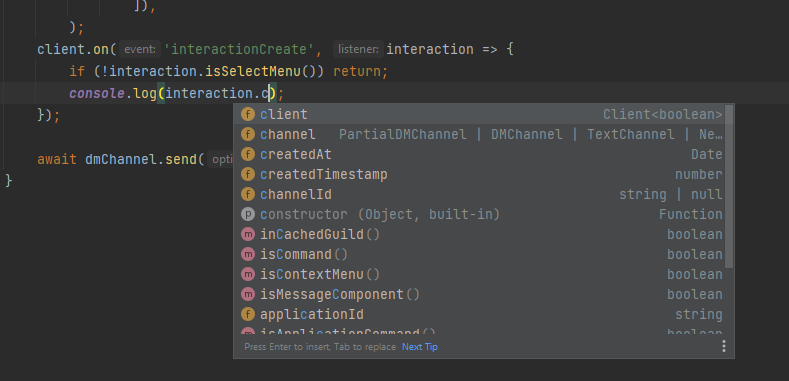
In the above image I have an event that receives an object of type Interaction. I type guard to insure the interaction is of the variant type SelectMenuInteraction .
The problem is, webstorm inspection does not show me the SelecMenuInteraction unique property .customId for autocompletion.
Is there any editor trick I can do to make the inspector treat the object as a specific class variant?
By comparison, here is the same codeblock in VSC with proper inspection and without illegitimate editor warnings.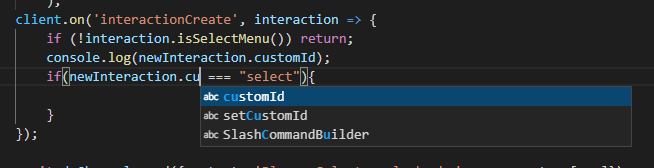
Please sign in to leave a comment.
>Is there any editor trick I can do to make the inspector treat the object as a specific class variant?
Please share a complete, self-containing code snippet (as text) we can use to reproduce the issue
>By comparison, here is the same codeblock in VSC with proper inspection and without illegitimate editor warnings.
screenshot shows that VSCode provides no completion except for basic words completion (note abc in the popup). An, unlike WebStorm, VSCode doesn't have any inspections to report unresolved variables, signature mismatch errors, etc.
npm install discord.js
const { Client, Collection, Intents } = require('discord.js');
const { token } = require('./config.json');

const client = new Client({ intents: [Intents.FLAGS.GUILDS, Intents.FLAGS.DIRECT_MESSAGES] });


client.on('interactionCreate', async interaction => {

    if (!interaction.isSelectMenu()) return;
    if(interaction.customId === "slecet"){
        console.log(interaction.values)
    }
});

client.login(token);
Thanks; the type of interaction is unknown, you can use inline comments to let the IDE know the exact type, like
That should work for me. Is there somewhere where I can read up on all the different behaviors I can get out of the IDE through comments?
You can find some info in https://www.jetbrains.com/help/webstorm/2021.3/creating-jsdoc-comments.html and linked docs