[Kinda Resolved] How to exclude/promote some code completion suggestions?

Context: I’m working on a Typescript project for a Node.js software.
Problem: WebStorm’s code completion first ranked suggestions are sometime not best suited for a given project. When it repeatedly comes with the wrong suggestion for a given module/ambient, I really want to exclude this suggestion or (best) to promote the second suggestion, so that next times, it comes in first position.
For example, I often use code assertions with the native module Assert to do type-narrowing or to prevent invariant.
import assert from 'assert';

const value1 = 123 as unknown;
assert(typeof value1 === 'number'); // value1 is type-narrowed to number

const value2 = 'str';
assert(typeof value2 === 'number'); // throws an AssertionError
However, whenever I start typing assert (no abbreviation kidding over here please), WebStorm suggests console.assert, which is really not what I want. Actually, any console.* thing is probably not what I intend in the first place.
How can I tweak the code completion engine to make it understand I want him to suggest the Node Assert module first?
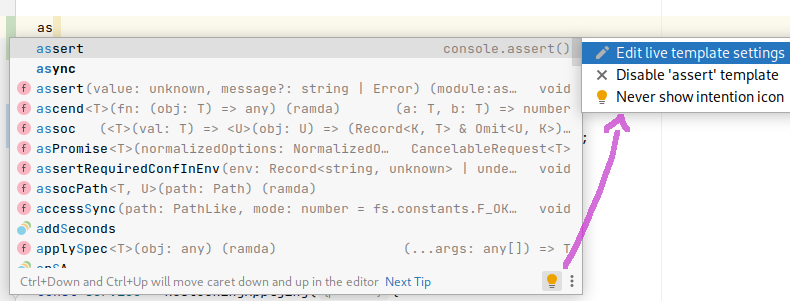
Kinda solution: I found a solution as I was taking a screenshot to illustrate the issue. I’m not sure it directly answers my question, but it solved my actual problem with the Assert module vs. console.assert().
Turns out there is a build-in Live Template for Javascript called `assert`, which unfolds the `console.assert($END$)` template. Live Templates always come first in suggestions. I disabled the `assert` Live Template, and the code completion engine gives me what I expect him to: the Node Assert module.
Please sign in to leave a comment.
You can remove live templates from completion by disabling
show.live.templates.in.completionkey in Registry ( Help | Find action..., typeregistryto locate it)Thanks for your answer Elena. Good to know! I find most live templates useful; only few of them are undesirable. Also, having live templates in completion is a good thing for discovery. I’d rather keep this setting enabled. I might farther explore this Registry thing though, sounds promising.
Here is another example I find quite offside: the first suggestion that shows up when I start typing “const” is a function expression template (something like “const $NAME$ = ($ARG$) => $END$;”). I usually favor proper function statements over function expressions, so this template isn’t relevant and I often activate it accidentally (maybe a bad habit of mine to hit the first suggestion as soon as I see one)...
I tried to find out how to disable this one, but couldn’t. It’s nowhere to be found: the light bulb doesn’t show up in the code completion window and I don’t see it in the live templates settings either. Any hint?
Thank you.
This is not a usual live template, this is a hardcoded template that generates a placeholder name and braces for
const; similar templates are provided for other keywords, see WEB-45718Please see comments in https://youtrack.jetbrains.com/issue/WEB-52674 for more info