Stuck in "Safe Mode"

My IntelliJ install claims to be stuck in "Safe Mode" for every project I open, and I can't tell it to trust projects. This is super annoying.
How I got here: I had a Java project open. I thought I'd try editing my `~/.zshrc` file in IntelliJ, so I opened it from the shell with `idea ~/.zshrc`. It popped open a dialog that asked if I wanted to trust my home directory as a project. I answered "no", and now every editor tab has the colored banner "Safe mode, limited functionality. Trust the project to access full IDE functionality" with links to "Trust project..." and "Read more". I closed the `~/.zshrc` tab, but all the other Java source files have the "safe mode" banner. Clicking on the "Trust project..." link does nothing (no dialog is opened).
Attempts to fix:
- I made sure that my project's root folder is listed in "Preferences -> Build, Execute, Deployment -> Trusted Locations". I also added my home folder to be sure
- I closed and reopened the project
- I restarted the IDE
- I did a full "Menu -> File -> Repair IDE..." cycle
None of the above fixes the problem, which is even present when I open entirely separate projects.
Theory: It feels like the IDE implicitly trusts files under your home dir, but when I told it to open `~/.zshrc` file in safe mode, it seems like the IDE now no longer trusts my home dir, even though it depends on files in the home dir. Just a theory.
Thanks in advance for your help.
Please sign in to leave a comment.
Hello,
What IDE version do you use? Is it possible to share idea.log ("Help | Show Log in...") after restarting IDE and clicking on the "Trust project..." link?
Hi Yaroslav,
The IDE version is IntelliJ IDEA 2021.3.1 (Ultimate Edition) Build #IU-213.6461.79
I deleted the `idea.log` file, restarted the IDE, and then clicked the "Trust project..." link (five or six times, with no obvious effect). I then captured the new `idea.log` file, which you can download from here:
https://aia-file-exchange.s3.amazonaws.com/for-jetbrains/idea.log
Please let me know if there are other files or other info that I can provide.
Is it reproducible with custom plugins disabled:
```
2022-01-04 02:17:31,768 [ 1182] INFO - llij.ide.plugins.PluginManager - Loaded custom plugins: Toml (213.5744.224), Projector (1.8.0), File Watchers (213.6461.19), Terraform and HCL (0.7.14), Kotlin (213-1.6.10-release-923-IJ5744.223), Save Actions (2.3.0), Wrap to Column (1.8.0), Grep Console (12.1.211.6086.0), TeamCity (2021.2.99602), Python (213.6461.79), Extra Icons (1.68.0.203)
```
Hi Yaroslav,
Unfortunately I can't try this, because I had to get my IDE functional again so I could work today. I opted for the nuclear option:
This resolved the problem.
Ok, we'll provide additional test on our side to reproduce the issue.
hi, I am having the same issue, I do not understand the solution, can you please explain?
As Yaroslav said, I deleted the log files and restarted and clicked on trust but it is not working.
Need help please
Could you please share "trusted-paths.xml" file from "options" folder in configuration directory: https://intellij-support.jetbrains.com/hc/en-us/articles/206544519 ?
For anyone seeing this, one fix can be to go to %APPDATA%\Roaming\JetBrains\PyCharm2021.3\options
And in 'trusted-paths.xml' change the appropriate values from "False" to "True"
The error append to me when i tried to open an non existing project and said "stay in safe mode", thus the parent folder of all my project was untrusted and i couldn't change it through the IDE, and all the subfolder wasn't trusted anymore even though i precised it in the parameters
Hi Damien -- Thanks, you're right, that's what I did too that triggered the problem. I used the `idea` command line app to open $HOME/.zshrc and told the IDE to stay in safe mode. This seems to have configured IntelliJ to recursively distrust everything under my $HOME dir, including all my Java projects which are stored under my $HOME/work dir, even though those projects themselves were configured as trusted.
I had quite the same issue today. And I reopened the untrusted project, clicking "trust". Everything became normal!
Same issue here. I've had to reset the entire xml trust file. On macOS is located at:
/Users/ferrao/Library/Application Support/JetBrains/*/options/trusted-paths.xml
I opened up trusted-paths.xml and deleted the line in `TRUSTED_PROJECT_PATHS` which referred to my root directory. Fixed! Thanks, everyone.
I just had to do @Damien Nzila-mouanda 's fix -- at least the 4th person do need this, it looks....
Really, the IDE needs a menu selection to clear a project to Make Safe -- which can change to Make Unsafe appropriately.
Then we will be in proper control. It shouldn't just be some fast, missable selection on opening a project.
And in fact, I don't think I made a mistake, though I could have. There may be other ways to be Unsafe.
As well, looking in that options file, there are two ways to specify -- and only the second one is able to be set in project Settings. This seems wrong in several ways...definitely EAP territory to get mapped better :) and thanks...
Had similar issue to others above. Opened a single file in my HOME directory, didn't trust it. I had deleted the file, and every project I opened after that was marked untrusted, banner stayed up and git no longer showed up for new projects.
In settings I marked both C: drive and HOME folder as trusted paths. Still didn't work.
Thanks to this thread opened `%APPDATA%\JetBrains\PyCharm2021.3\options\trusted-paths.xml` and lo and behold on the top line was `<entry key="C:\Users\Me" value="false" />` removing that solved everything. Thank you @Damien Nzila-mouanda for figuring that out!
On MacOS open
and remove the line with the project that is blocked.
The problem is that a trust=false setting in a parent folder overrides the trust=true setting in child folders.
Go to your "~/Library/Application\ Support/JetBrains/IntelliJIdea2021.3/options/trusted-paths.xml" and remove the offending parent folder setting.
The same problem also exists in GoLand.
@..., FYI.
I had the same problem. The solution outlined by several people above works. The arrow points to the culprit line in my trusted-paths.xml file. Is JetBrains going to fix this issue?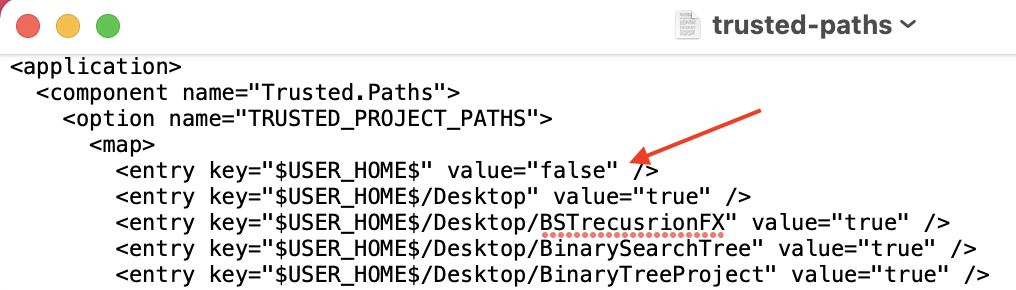
Thank You Damien Nzila-mouanda for your help.
Close PhpStorm then
Find your project path in this file:
%APPDATA%\Roaming\JetBrains\PhpStorm2022.1\options\trusted-paths.xml
and locate value attribute and set it to true
example:
to
now run Phpstorm then File => Invalidate Caches => Invalidate and restart
now everything should work fine
Hope this helps.