How to change background in conditional breakpoint dialog?

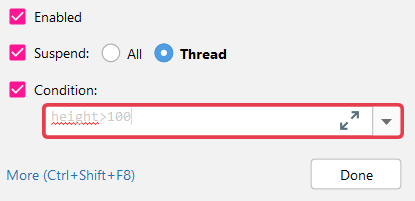
The conditional formatting dialog has a field for writing in the conditions, ie height>180 etc
The foreground text of this field is linked to 'default text' foreground
The background however appears to be hard-coded to white (#000000)
when running dark themes ie white text on black background, I end up in a situation where the foreground and background for the conditional formatting field are the same ie white. Foreground is obtained from 'default text' and background is white too.
Is there any way to change the background for that field or have it linked to 'default text background'?
Here is an example:
Please sign in to leave a comment.
Could you please post a screenshot? Here's how it looks for me with the default Darcula theme:
Please disable all custom plugins and themes, and if the issue is still reproduced, let me know.