Custom Configuration Folder is not shown for Spring Boot project
Answered

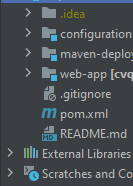
I want to add custom configuration file from "configuration" folder below. However it is not visible. I only see folders on second picture.

Please sign in to leave a comment.
Most probably, it is caused by the fact that configuration folder is marked as module.
So, what can be done to select properties from that folder_? I can not set it as "not module"
What command displays that configuration window? I do not see the "Choose Custom Configuration files" dialog within IntelliJ IDEA bundled functionality, so I cannot trace its logic.
However, I suppose that removing the configuration folder from the "modules" structure could fix that: https://i.imgur.com/rzlpI8L.png
It did not work unfortunately.
I do not know the command either.
How do you invoke the "Choose Custom Configuration files" dialog?
May you record a screencast?
Here. even if configuration folder is visible on dropdown, inner folders are not fetched.
Does it help to use Windows native file chooser?
It could be enabled by ticking
ide.win.file.chooser.nativeregistry option.You may open registry via "Help > Find action > Registry".
That has worked. Thanks!
But the main reason for me to write about this issue, is that I can not run project with Spring Boot Run configuration.
But if I run it via Maven first, then stop it and run with Spring boot again, it works.
The error is that "class path resource [cvqs_app.properties] cannot be opened because it does not exist" when trying to run with spring boot without first maven run.
I was thinking this was about Spring-run cant read properties folder location from pom.xml's <resources> tag and showing custom configuration files would be the solution. I succeed to show custom conf. files thanks to you, but this main problem continues.
Try the latest. version of IntelliJ IDEA (2022.1). If the issue is still here, please share a sample project via https://uploads.jetbrains.com
It did not work. And I think properties is not visible to Intellij run even if I was able to choose them with native file chooser.
Because they are still not resolved by Intellij as below
What is your @WebAppConfiguration path?
Could be related to https://youtrack.jetbrains.com/issue/IDEA-165351
Is it possible to share a sample project?
Seems to be related with these issues since I can not select properties and variables in property files are grayed out and not referenced. They are not seen by Intellij and Spring
I do not use @WebAppConfiguration path
I uploaded sample project here:
Upload id: 2022_04_15_NcLq68mrRAT19j8h
Does it help to reload Maven project?

No it does not
Oh, importing your project and realized that importing properties file from another module is not working, and this is expected.
See https://youtrack.jetbrains.com/issue/IDEA-180498/Spring-Boot:-handle-complex-custom-configuration-file-setups#focus=Comments-27-5313054.0-0 (except #6 part of the comment)
Are we totally sure that we can not set custom properties from another module because 1-2 months ago I was able to set these configuration files
Yes, just confirmed that with the responsible developer. This is not yet implemented.
Maybe there was another project structure?
I can not remember exactly but I remember that PropertiesConfig class was able to see properties files and properties was not grayed out.
On the other hand, I have just moved config files to main module and set them as configuration files but still PropertiesConfig does not see them and properties are grayed out.
How do you define the path? Is it related to resources root?
You are right. I thought they would be resolved as they did before. Now they are not grayed out and resolved.
Thanks for your patience. It would be great if I could set properties from different module and will be waiting for that development.
And I am sure it worked back then but it has broken somehow.
Vote and follow this feature request to be notified once there are updates on this matter:
https://youtrack.jetbrains.com/issue/IDEA-292431