IJ hogs cpu on mac and self-contradicts about background tasks
Answered

My IJ frequently starts sky-rocketing on cpu usage for no apparent reason. I am talking about 1000% cpu for as long as 30 minutes (until I decide to kill it)
I'm checking if something runs in the background and I see:
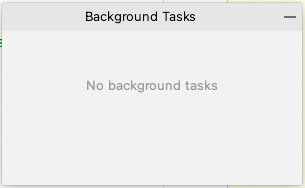
I then decide to restart it, but when I press menu->exit, it says
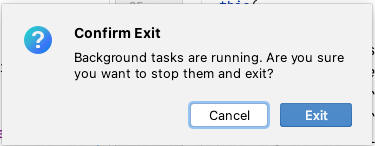
So, are there backend tasks or aren't there? Is there another way to see and kill background tasks apart from Window->Background Tasks->Show?
I am running IntelliJ IDEA 2021.3.3 (Ultimate Edition) Build #IU-213.7172.25, built on March 15, 2022
on macOs Monterey 12.4
Please sign in to leave a comment.
Hello,
Is it possible to provide CPU snapshot (https://intellij-support.jetbrains.com/hc/en-us/articles/207241235-Reporting-performance-problems)?
I will provide it next time it happens. thx
Thanks! I'll be waiting.
I uploaded the cpu snapshot to your upload service
Upload id: 2022_05_27_13MVuM3ck6XCsYWQ (file: IU-213.7172.25_gilgaribi_27.05.2022_17.57.11.zip)
btw, the article says i can attach files < 10M directly to the ticket, but I found no way to attach files that are not images. thx
Is it possible to upload logs folder zipped as well (https://intellij-support.jetbrains.com/hc/en-us/articles/207241085-Locating-IDE-log-files)?
Do you use any antivirus software or data protection tools?
I am waiting for the issue to recur before I collect logs - I wasn't working those last few days..
We have plenty of antivirus and data protection tools running on our corp machines. Afaik, all of them are in-house products. Anyway, I didn't find other developers in my org with a similar set-up that experience such an issue.
Thanks for information! I'll be waiting for logs to check your configuration.
Issue is now going on again. IJ showing in Activity Monitor with 600% CPU. Same behavior with Background Tasks - Show dialog says I have none, but when I try to quit IJ it asks if I'm sure I wanna quit while Background Tasks are running.
Uploaded zipped logs via your upload server:
Upload id: 2022_06_16_ZVNWh4376KTRFyamkYauf7 (file: idea-logs-20220616-0846009977698276477659709.zip)
Could you please try to temporarily disable custom plugins: "Loaded custom plugins: Waze EngProd (2.0.15.0), Cloud Code (22.5.1-213)"?
Is it possible to check the issue with 2022 IDE version?
Unfortunately, I can't try 2022 IDE until my organization switches to it.
About the plugins, do you think I can prove those are the culprits if I try to disable them while the problem is going on? I mean, would you expect it to solve the issue immediately in such a case? Problem is, I rely heavily on those and if I just disable them and the problem doesn't recur, I won't be sure this indeed was the root cause..
Thanks again for looking into it and replying so promptly
You may try to disable them when the issue occurs.