Broken error highlighting

Hi there, I got an error of highlighting: when I make a typo, the IDE highlights it, but the highlighting doesn't go away after I fix it. After restarting the IDE, the highlighting of the error disappears, but the highlighting of new errors still does not disappear. I'm try 'Invalidate Caches...', 'Repair IDE', adding some directories to excluded, increasing memory to 4GB and even reinstall WebStorm - none of this helped me. But this bug appears only in one file (at least I noticed it only in one file), which at first sight is no different from the others, and it's working. It's DAOs TypeScript file for Nestjs framework.An example of an error on the screen attached below: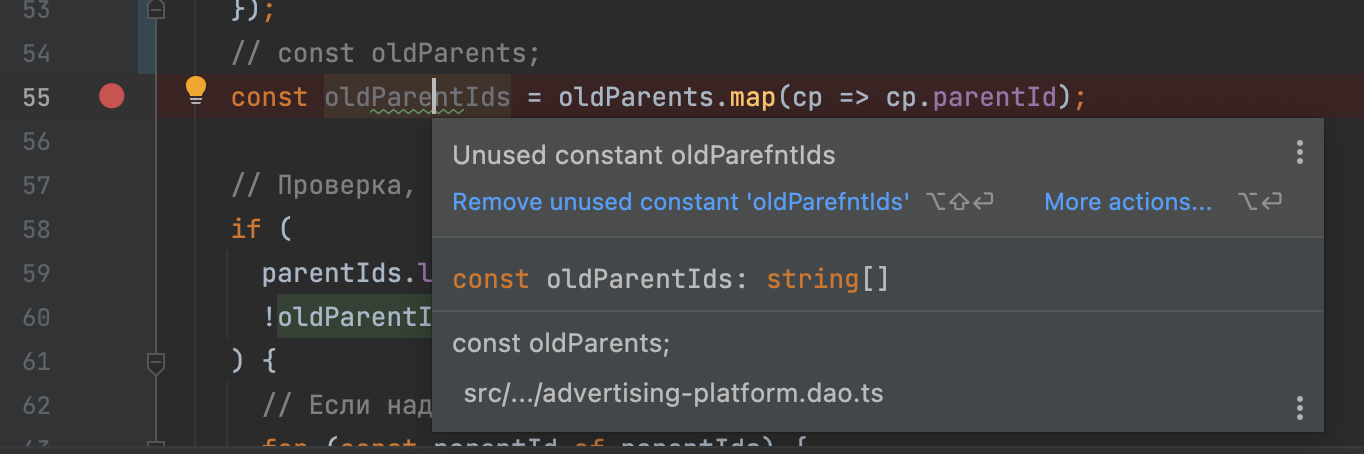
My Webstorm version is 2022.1.3, Build #WS-221.5921.27 on MacOS Monterery 12.3.1
Does anyone have an idea how to solve the problem? Thanks in advance.
Please sign in to leave a comment.
Normally caches invalidation helps with such issues... I'd suggest creating a support ticket, attaching the idea.log after caches invalidate > restart > reproducing the issue
Unfortunately, my ticket has been hanging for almost two weeks without a response...