Build large maven project

I am trying to build a large multi module maven project.
This project contains nearly 3 millions of lines of Java code. and nearly same of Javascript. The projects contains nearly 300 maven modules.
The project use also some annotations processors, as lombok. mapstruct, and hibernate-jpamodelgen.
When 1 build the project with Intellij. I have an issue whith the hibernate-jpamodelgen ggenerated classes.
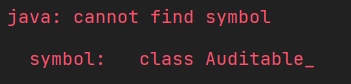
The class is well generated, and we can notice that the annotations directory is considered as a source folders.

In the class who use the class Auditable. No issue is shown. I even have the auto-completions when I try to access to the properties of this class.


To handle this huge projects I tried to optimized Intellij. I add some vm arguments following these articles : The One and Only Reason to Customize IntelliJ IDEA Memory Settings - DZone Performance

The 4 last lines where already there. I guessed they where added by Jetbrains toolbox.
I also followed the recommendations written in this article IntelliJ IDEA Tips & Tricks: Improving performance | Vojtech Ruzicka's Programming Blog . in particular the disable unused plugins, power-saving mode and the faster program switching parts.
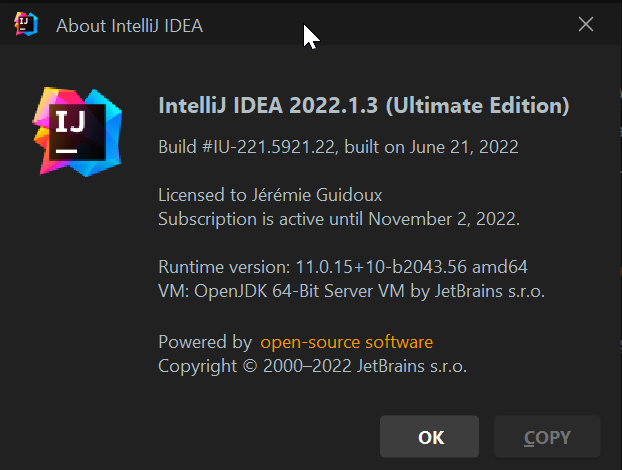
my Intellij version is :
and my computer configuration is :
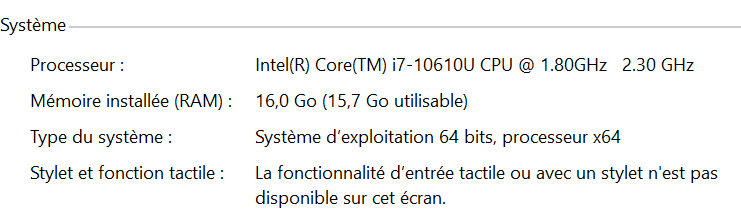
I didn’t remove unused modules, because for now, my goal is to have the show my company is able to deal with the complete application.
Update :
When I import only the module Wich have the complication issue, intellij is able to built it with no issue. And of course maven can build it too.
I hope you can find a solution.
Regards,
Jérémie guidoux
Please sign in to leave a comment.
Bonjour Jérémie,
Does it help if you run File | Invalidate Caches | Invalidate & Restart with the first checkbox ticked?
Please also provide the resulting archive of the Help | Collect Logs and Diagnostic Data operation after reproducing the problem. You can upload it privately to https://uploads.jetbrains.com, and provide the upload id.
Hi, thanks for your answer ,
Unfortunately I won't have my computer for few days. I will send you the logs as soon as possible.
I was wondering, in your opinion, is intellij supposed to work well with this kind of large application ? And, is there a recommended configuration in that case ?
Hello.
I did the invalid caches manipulation. But no changes. The build block at the same step.
I uploaded the logs and diagnostics : the id is 2022_07_17_94ZXaU64C3Zf94xKtV8rak .
I hope this will help to find a solution.
Regards,
Hi Jérémie,
Thanks for the logs.
I see numerous conflicts in the local .m2 repository. Could you try updating the current repository under File | Settings | Build, Execution, Deployment | Build Tools | Maven | Repositories to see if it helps?
In general, it shouldn't be a problem on high-end PCs using high-frequency multi-core CPUs and 16+Gb RAM. The more RAM the better actually, since its consumption directly depends on the project's size.
See also:
Hello,
I changed the repository. But no changes.
I Increase -Xmx to 5G, but no changes either.
I uploaded new logs after the build. The new ID is 2022_07_18_WvqmxdotCzY41PS8uydJMg
Regards,
Jérémie
Thank you.
Would it be possible to also upload your main pom.xml, and the pom.xml of the module in question?
Unfortunately, this is not an open source application. I can’t deliver you a part of the source code.
I will try to describe the maven architecture.
We have a super parent pom for all the company. which mainly have properties and dependencies management.
We have a parent pom for the application. This one has a particular configuration for the maven-compiler-plugin
The application it-selft has 2 level of maven-modules
theProject
|_pom.xml
|_ aSubModule/
|_pom.xml
|_subSubModule-interface
|_pom.xml
|_subSubModule-implementation
|_pom.xml
In my context, the compilation error is in subSubModule-implementation. The pom.xml of the subModule and subSubModule-implementation are not complexes, they only have some dependencies/dependenciesManagement but no plugins.
The root pom.xml of the project contain these plugins : cxf-codegen-plugin, jaxb2-maven-plugin, jspc-maven-plugin, org.codehaus.mojo, maven-jar-plugin, maven-release-plugin, maven-source-plugin, maven-surefire-plugin and of course the maven-compiler-plugin as describe below.
The company pom.xml contains these plugins : maven-enforcer-plugin, maven-eclipse-plugin, the sonar-maven-plugin. As the maven-enforcer-plugin is a bit complexe you can find its configuration above
The project use many technologies, including spring, spring-boot, jdk17 etc.
I noticed that IntelliJ has some difficulties with subSubModules. For example, I can’t in the maven view. Unlink a project which is a subSubModule. Intellij, in that case, inform me that it can’t unlink the project because the subSubModule is not a direct module of the root one.
I hope this will help you.
Hi,
Do I understand correctly that the problem is that when you build the project from IDE - it reports the symbol not found, even when the Editor shows no errors?
Can you build the same project by the Maven from the command line successfully?
Will IDE build successfully if you invoke to build just one this module (from the module's context menu)?
To better understand the structure, could you please describe where the classes which are not found are located in project exactly? Are they in the same module or you use them as a dependency? If you configure them as a dependency - how exactly do you configure this dependency?
Thank you.
Hi Andrey,
Yes the issue is in the IDE. With maven in command line, no issue, in my computer or with the CICD pipeline.
I think I build the module alone from the context menu, but I will check tomorrow and keep you inform.
I also in another instance of intellij imported only the problematic module. And Intellij successes to build it
The classes which are not found are located in the same project but they are generated classes using hibernate-jpagenmodel. To be more precise we use the annotation processor of the maven-compiler-plugin. The configuration of this plugin is on the root pom of thistle project. You can see that in the screenshot of my previous comment.
The generated classes are generated in the director target/generated-sources/annotations. You can see it in the screenshot of my first post.
Intellij seems to be able to notice that this directory is a generated source directory.
https://intellij-support.jetbrains.com/hc/user_images/SnkGj0JsGMzWN0utR29JMQ.png
>The generated classes are generated in the director target/generated-sources/annotations. You can see it in the screenshot of my first post.
In which module are they generated?
In which module do you get the build errors about not found classes? Or are they located in the same module which fails with build errors about these generated classes not found?
How dependencies between these two modules are configured?
When building, IDE construct the build classpath, based on the modue's dependencies (you see them in module's Dependencies tab) + module's source directories. So these generated classes must be either in the same module's source directories (source roots) or must be located in the module which is set as a dependency - and so you must see it in the Dependencies tab.
Hello,
I was not enough clear in my previous message.
Generated sources and the and the file with the compilation error are in the same module.
This is the project structure of this module :
I try to build only the module `programmation-hospitaliere-implementation`. Same error.
In another instance of IntelliJ I imported all the module `programmation-hospitaliere` and not only `programmation-hospitaliere-implementation` as I did before.
In that IntelliJ instance. I was able to build it with success.
`Programmation-hospitaliere` is a direct module of the root project.
>I try to build only the module `programmation-hospitaliere-implementation`. Same error.
Hm, earlier you said the if building only this module - it works. Could you please clarify in which situations will it fail? Also please try - will it work if you try to build the second time? Please also try this action.
I try 3 ways.
In one way I have in my Intellij all the complete project. In that context. I never successed to build the project. Even if I build the complete project or only the project `programmation-hospitaliere-implemetation`
The second way. In another Intellij instance, I have only the project `programmation hospitaliere`. In that case. No issue. I can build all programmation-hospitaliere or only the project `programmation-hospitaliere-implemetation`. All works
The third way. In another Intellij instance, I Have only the project programmation-hospitaliere-implemetation. Here, too, it works too.
So It only failed when I have the complete (and huge) project. programmation-hospitaliere is a small module compare to rest.
I am going to try this action
I tried the action `generate sources and udpate folders for all project`
Then I build the project. The result changes. So we are maybe on the good way :)
This time the built stopped due to a `java: java.lang.StackOverflowError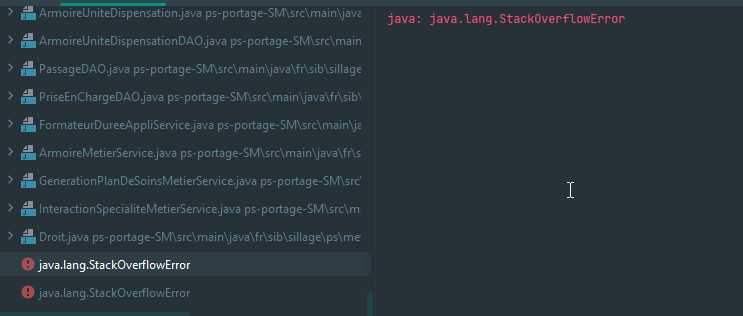
`
My actual VM options are :
Maybe I should increase this line. I don’t really get this option :
>Maybe I should increase this line. I don’t really get this option :
Yes, please set bigger value for the Shared build process heap size.
If this error remains, please provide full build output and IDE logs zipped (Help | Collect Logs and Diagnostic Data action). For uploading you can use https://uploads.jetbrains.com or any file sharing service.
After the "generate sources and update folders for all project". Build the "programmation-hospitaliere-implementation" only works now :)
But for all the project, I still have the java.lang.StackOverflowError error
I tried some different values for Shared build process heap size. and -Xmx
At the end I have "Shared build process heap size".= 2048 and -Xmx = 6G
But unfortunately I still have the stackOverFlow error
I uploaded the data and logs file : id = 2022_07_21_bJkR7171FvcFwvtbepjwdt
Thanks.
This looks like bug in Lombok or javac. Try using different JDK or Lombok versions to build the project.
Hello, I’m using actually lombok 1.18.22 et java 17.
openjdk 17.0.2 2022-01-18
OpenJDK Runtime Environment (build 17.0.2+8-86)
OpenJDK 64-Bit Server VM (build 17.0.2+8-86, mixed mode, sharing)
I will try to us lombok 1.18.24. Then another jdk
With Lombok 1.18.24. I still have the StackOverFlow error. But it was longer. This time, the build last 10min before failings.
I’m going to try with another jdk
I tested with the jdk 17 from oracle. Same.
I can’t downgrade jdk under 17. Or Lombok under the version 1.18.22.
I did another collet logs and diagnostic data in case. Id = 2022_07_22_8TgaCP7Xfgf9KUS8hhdWH7
There is a Lombok bug: https://github.com/projectlombok/lombok/issues/2453 Please vote for it in Github. Also might be worth asking if there are any workarounds in the issue. As I see here sometimes the long method chains can cause this: https://github.com/projectlombok/lombok/issues/3032
I will look with them. But I wonder. Why without intellij, when i am building the whole project using maven, or works well ? Maven use lonbok too
This might be related how the lombok is called.
I have some more information
On my large project. I found one project where I always have this exception when building this module.
Even if I open another Intellij instance which contain only this project. In that case, when I build this project, I have the same exception with the same stacktrace.
I don’t know how is going the issue on lomkok side.
But maven is able to build that projec,. and Eclipse too.
Hello.
Some new Information.
Apparently Lombok is fixing that bug. Meanwhile. We can increase the jvm option -Xss.
I already had the environment variable MAVEN_OPTS=-Xss5m.
This can explain why maven succes to build the project. I decrease this variable and noticed that under -Xss830k, mvn compile produce this stackoverflow. Upper to this value. mvn compile is a success.
So I think that by default intellij launch lombok with a low value for -Xss
I thy to edit the custom VM options in Intellij
But no impact :(
I also created an environment variable JVM_OPTS=-Xss5m. No impact.
So. Is it possible to launch lombok, or all annotations processors tools, with a specific -Xss ?
Thanks
For the build process, please set VM options in the Settings (Preferences on macOS) | Build, Execution, Deployment | Compiler | User-local build process VM options (overrides Shared options).
Adding -Xss5m works :)
I have the impression that I have some troubleshoots with the generated sources. I am not sure yep. I keep you aware of it