Set Tab rendering width.

I am currently working on a project that has some specific rules for indentation. Every 8 spaces get converted into one tab, so indenting by 1 level would be 4 spaces, indenting by 2 levels would be 1 tab, indenting by 3 levels would be 1 tab and 4 spaces.
I have set the Code Style for this project (JavaScript as well as Perl) as follows:
I have also made sure to disable reading of .editorconfig files. I have set the Code Style project-wide as well as globally.
In order to properly display the source code for this project, I would need IntelliJ to render a Tab with the same width as 8 spaces. I expected this to be the case after setting Tab size to 8. Nevertheless, the source code files still get displayed with tabs that are 4 spaces wide:
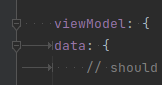
I'm at my wit's end here, I thought it should be easy to tell IntelliJ to render a Tab as 8 spaces, but it seems like an insurmountable problem I've encountered. Am I doing something wrong or is it just not possible to tell IntelliJ with which width Tabs should get rendered? I don't particularly care for Auto Indentation whatsoever, I just want to be able to read the source code properly...
Please sign in to leave a comment.
I think I have found the issue. I am currently working via the new IntelliJ Remote Development feature on my local VM. I use my IntelliJ to remotely connect to an IntelliJ instance in the VM to edit the code that is stored there. When I copy the files from the VM to my local machine and set IntelliJ up as pictured in my first post, the code is properly formatted. Changing the Code style settings in the Remote Development client doesn't seem to have any effect on the rendering. Any ideas or is this still a Bug in the Remote Development feature?
Thank you for the feedback. Yes, it seems to be an issue related to https://youtrack.jetbrains.com/issue/CWM-5881/Settings-synchronization. Please vote for and subscribe for updates. It's currently in active development, and I'll add your case to the topic.