Trouble setting python venv interpreter

I'm creating a new project with the default configurations given by pycharm but I keep getting an error message when it tries to activate the venv.
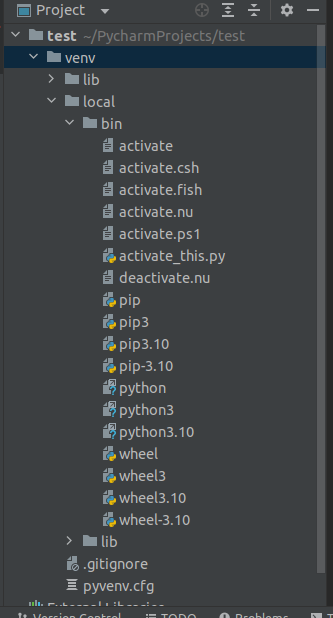
I notice that the folder structure created for the venv have a additional "local" folder inside it, which is making pycharm fail on adding the interpreter.
I tried to add the "local" folder on the environment path, but it creates a new "local" folder and fails anyway. Once the project is created and everything fail, I can manually add the interpreter selecting the files inside the "local" folder created.
Is there anyway to override the path it's using to find the python interpreter and making pycharm consider the local folder? Or anybody knows how to stop it from creating it?



Please sign in to leave a comment.
PyCharm itself is not creating any additional folders in the venv folder.
Try creating a virtual environment manually using the virtualenv venv command and see if it works. If it does and the venv is functioning properly, check if adding it to PyCharm works (as previously configured interpreter).
When I do things manually they all work fine.
I was trying to fix this behavior that is happening when the virtualenv is created once a new pycharm project is created.
Could you report it to https://youtrack.jetbrains.com/issues/PY and provide your idea.log file from Help | Show Log in... after reproducing the issue/
We'll take a closer look.