If you switch to a specific kind of search (e.g. Classes or Files or Symbols) instead of "All" then you will be able to select the scope where to perform the search (e.g. "Project Files" instead of default "All Places" or "Project and Libraries").
If those are Composer packages then by default such folders will be marked as Excluded (so they are not treated as your own code) and then re-added back as PHP Include Path (so the IDE can still use index them and offer stuff in code completion / check for function signature / navigate to definition etc etc). And for "All" tab it is kind of expected that it lists stuff from all indexable places (as it also includes IDE settings and actions, DB stuff etc)...
They also show up even switching to "Files" or "Classes". They are vendor packages added via Composer. How do I mark them as Excluded again (obviously at some point they must have been removed from Excluded).
I tried just now to disable PHP -> Composer -> Add packages as libraries, but the search appears to be the same.
They also show up even switching to "Files" or "Classes".
Have you changed the scope there? Sounds like you forgot about this part.
How do I mark them as Excluded again (obviously at some point they must have been removed from Excluded).
By default they will be excluded (the root folder for that package) and then re-added back as PHP Include path entry (so it's a 2 step/place setup).
I tried just now to disable PHP -> Composer -> Add packages as libraries, but the search appears to be the same.
Yes, turning that option off does not affect already made changes (it does not remove them from Excluded or Include path) -- you would need to do it manually.

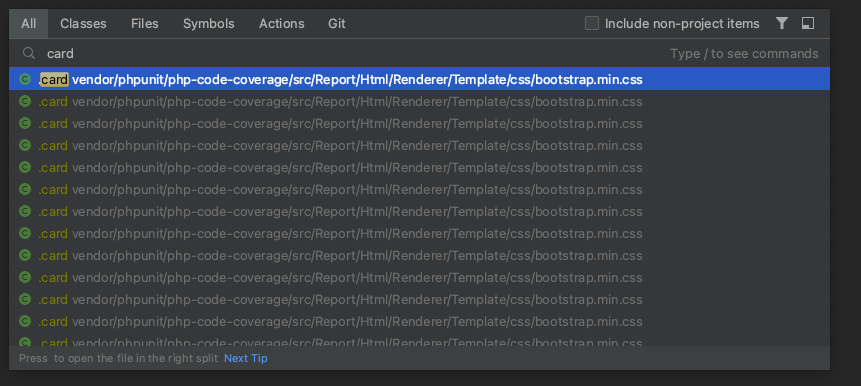
Hi there,
If you switch to a specific kind of search (e.g. Classes or Files or Symbols) instead of "All" then you will be able to select the scope where to perform the search (e.g. "Project Files" instead of default "All Places" or "Project and Libraries").
If those are Composer packages then by default such folders will be marked as Excluded (so they are not treated as your own code) and then re-added back as PHP Include Path (so the IDE can still use index them and offer stuff in code completion / check for function signature / navigate to definition etc etc). And for "All" tab it is kind of expected that it lists stuff from all indexable places (as it also includes IDE settings and actions, DB stuff etc)...
Hey Andriy Bazanov, thanks for the reply!
They also show up even switching to "Files" or "Classes". They are vendor packages added via Composer. How do I mark them as Excluded again (obviously at some point they must have been removed from Excluded).
I tried just now to disable PHP -> Composer -> Add packages as libraries, but the search appears to be the same.
Have you changed the scope there? Sounds like you forgot about this part.
By default they will be excluded (the root folder for that package) and then re-added back as PHP Include path entry (so it's a 2 step/place setup).
Yes, turning that option off does not affect already made changes (it does not remove them from Excluded or Include path) -- you would need to do it manually.