Clion and 'Toolbox' both show different version to update!
Answered

I got a notification in Clion to update it to 2022.2.4!
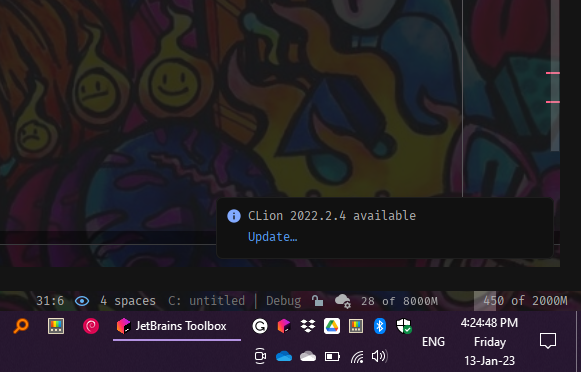
But I went to Toolbox and saw that a newer version is available to update.

Jetbrains please fix this.
Please sign in to leave a comment.
I had to update 'Clion' twice to get to the updated version.
The same thing I had to do with IntelliJ and Pycharm!
Since you have recently installed the Toolbox App, I will explain how it works. In the current implementation, we separate the IDE installed with Toolbox App and the installer, as in your example CLion, so it appears in the Manually Installed section. The only difference is that the Toolbox App cannot fully control the IDEs you downloaded manually from the website. So when you update these, you get two CLion. The old one remains in the Manually Installed section, and the new one is displayed above as Installed. This only happens once during the "transition period". You can uninstall the old version and switch entirely to the version installed via Toolbox App.
Well, I needed to update Clion even IntelliJ and PyCharm 'twice' to get updated to the latest version.
Was it a bug?
Can there be something that I can get to the latest version by just updating it once?
It needs to be investigated. Could you please attach toolbox.log to https://uploads.jetbrains.com/ and give an ID here?
The log file can be found in `%localappdata%\JetBrains\Toolbox\logs` or under Settings|About. Thanks!
I extremely apologize for the unclear answer.
When I tried to update the IDEs from Toolbox they got updated to the latest version the first time.
Then it made two copies of the app. The one with the older version and the one with the latest version.
So after that, I decided to try to update them through the IDEs themselves, as shown in the 1st Screenshot. because Toolbox didn't give me the option for the 'Open Folder in [IDE]' button for the RIGHT-CLICK Context menu.
This is when I had to update each of them twice to get to the latest version.
:(
I am sorry for my late reply.
You are free to ask anything! ~
I understand what you're writing about. It's exactly what I was trying to describe in my first post.
When you switch from using a manually installed IDE to an IDE managed through the Toolbox App, the actual version you installed is not updated. It remains so in the section manually installed. You get another one of these, but a new one is displayed in the Toolbox App at the top, in the Installed section.
One of the expected ways to do this is to uninstall the old version and switch entirely to the updated IDE. However, it is true that IDEs installed via Toolbox App are currently unable to open the directory with the editor. It is in our plans to improve integration with the OS.
Our issue tracker has an open issue about this https://youtrack.jetbrains.com/issue/TBX-2478. Nevertheless, feel free to comment or upvote.
So you had to update the old version, installed manually. As a workaround to get the feature Open Folder in [IDE], you can use both IDEs.
I hope we got it sorted out :)
Sweet!