Tool Window Tree appearance
Answered

I know the answer is probably simple, but I haven't found a resolution in any jetbrains FAQ, IntelliJ Documentation, this Support thread, or searching online.
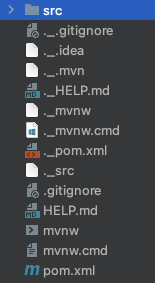
I am giving IntelliJ IDEA a try to see worth personal purchase. The problem is right after installation and opening first project I have "_.xxx" for each file in the Tool Window tree that doesn't need to not be showing (screen shot here). The installation is on a Mac M1, and these versions of the files does not appear anywhere else in the OS Finder folders, online in the IDE.
Thanks in advance for any feedback and/or advice.
Please sign in to leave a comment.
Please try adding
.__*file pattern underPreferences | Editor | File Types | Ignored Files and Foldersto exclude these files from appearing in Project View:Most likely, these files were added by the OS. Do you see them if you open the project in Finder and enable showing the hidden files (Cmd + Shift + Dot)?
Where is your project located? Is it a local or network drive?
Much Appreciation Egor for the feedback as I was successful in removing the Mac hidden files from view.
On a Mac, you can find the Ignored Files and Folders via
IntelliJ IDEA | Settings | Editor | File Types | Ignored Files and Folders.No, not anywhere else. As previously mentioned I didn't have this issue outside of the program. I initially thought the same (the Finder in OS changed things) but it did not.
Local drive. On a current project I place the project folder on the local Desktop or local connected external drive. When project is done, I move from the Desktop to the external drive or NAS.
...thanks again Egor with my ._ issue in the software!