Annotator message formatting
已回答

Good day,
today I'm trying to format messages for ErrorAnnotator and cannot find how to do it.
An example I've seen in Kotlin is Type mismatch from method call like:
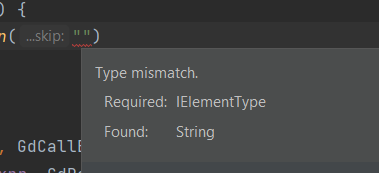
Yet I cannot find how is this achieved as natively it doesn't seem to support \n, multi-line nor html within message by default
holder
    .newAnnotation(HighlightSeverity.ERROR, """
Type mismatch.\n<br />
  Required: $paramType\n<br />
  Found:    $currentType""")
    .range(element.textRange)
    .create()

Although when I press Ctrl+F1 twice, it seems to register multi-line string, but only after that second press.
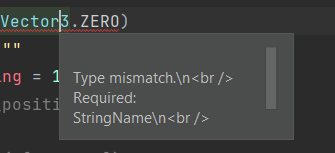
I'm very gratefull for all your help and activity on this forum, does anyone know how this formatting can be achieved?
wish you a nice day.
请先登录再写评论。
Hi,
It can be easily found in the intellij-community sources by following one of the API exploration techniques: Search by UI Text.
If you search for case sensitive "Type mismatch" phrase in production files, you get 15 results, and one of them is:
https://github.com/JetBrains/intellij-community/blob/master/plugins/kotlin/base/fe10/highlighting/resources/messages/KotlinBaseFe10HighlightingBundle.properties#L59
Thanks, for anyone else looking for it the main thing is to send message into .tooltip() instead of message param of newAnnotation