Folded imports with unused import dont have gray highlighting
已回答

Hi all. I have a problem. Every time I commit something, I usually forget about the unused import because I don't see it when the import is collapsed.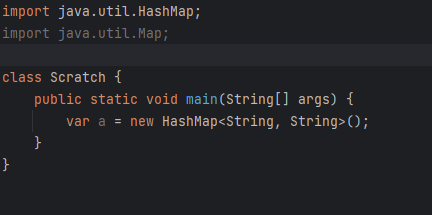

It is possible to make collapsed import gray?
请先登录再写评论。
Hello!
IntelliJ IDEA does not provide an option to change the color of folded imports, but it does offer a helpful way to find and remove unused imports before committing your changes.
You can use the "Optimize Imports" feature to remove the unused imports in your code. To do this, go to the "Code" menu -> "Optimize Imports" or use the shortcut "Ctrl + Alt + O" (Windows/Linux) or "Cmd + Opt + O" (Mac). This action will remove all the unused imports in your code.
You can also configure IntelliJ IDEA to optimize imports automatically when you save a file or commit a change. To enable this, go to "Settings" -> "Editor" -> "General" -> "Auto Import" and select "Optimize imports on the fly" and/or "Optimize imports on the commit."
I hope this information helps with your question. Please let me know if you have any further concerns or questions.
Thanks for Your answer!
I know about the ways you said. But was it before? I think I've seen something like this before. If I'm wrong please correct me. Or maybe you know what plugins have implemented this?
It depends on imports order - if the first import is used then folder import block is coloured, if the first import is not used then folder block is greyed.