Intellij Debugger Variables Page shows weird format

Hello,
I am running into an issue in Intellij where, while using the Debugger, the class level variables (especially things like Lists / Maps) are shown in a weird format. For example, when expanding a HashMap, I see the following format:
> table = {HashMap$EntrySet@7689}
> entrySet = {HashMap$EntrySet@7869} size = 1
size = 1
modCount = 3
threshold = 12
loadFactor = 0.75
keySet = null
values = null
If I right-click the variable, and go to View as -> Map, it seems to fix everything and go back to the more user friendly view of a Map. However, if I advance the debugger one line of code, I have to do this all over again. It's a real pain to have to keep manually changing the view and I'm guessing I mistakenly changed some setting to default to this weird view, but I'm not sure how to find that. Does anyone have any ideas on this?
请先登录再写评论。
Every time I open a HashMap, I see something like this
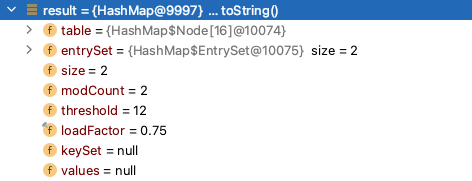
Nope - as an additional sample, here is what I do to change the view to see a more user friendly Map:
I change the check box from "unnamed" to "Map", which fixes the issue
I had the same Problem. I could fix it by checking the “Enable alternative view for Collection classes” checkbox under “File | Settings | Build, Execution, Deployment | Debugger | Data Views | Java”.