Version Control bug
已回答

Every time I start PyCharm this happens: 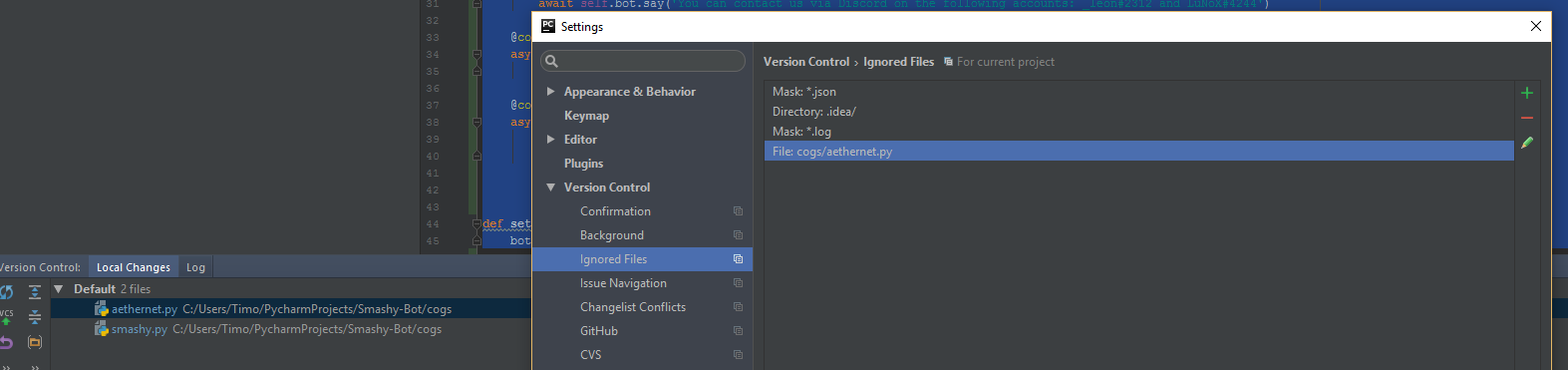
When I revert the changes and then do them again manually it acts the way it's supposed to. That is until I restart PyCharm and get greeted with a blue instead of a green-ish file name.
Edit: spelling
请先登录再写评论。
I'd like to try and recreate this myself. Can you give me the PyCharm version that you're using, then a sequence of steps in an empty directory/project to perform?
I don't really have steps to reproduce, this just happened during the process of developing. I added a specific .py file, accidentally committed it, deleted it on Github, then added the specific file to the ignore list, the bug above seemed to happen randomly afterward. It seems to work now, though. Gonna report back if it occurs again or I have more detailed info.
My version:
PyCharm 2016.3
Build #PY-163.8233.8, built on November 22, 2016
Licensed to Timo Bakr
Subscription is active until December 11, 2017
For educational use only.
JRE: 1.8.0_112-release-408-b2 x86
JVM: OpenJDK Server VM by JetBrains s.r.o