Build CheckboxTree from the selected project files

Hey!
First of all I want to say that I'm not from the Java world =)
The task that I want to solve: select the selected files / folders in the dialog in CheckboxTree with the structure preserved and filtering "images only". I was faced with a problem in choosing the approach to solving the problem.
Here is the test structure:
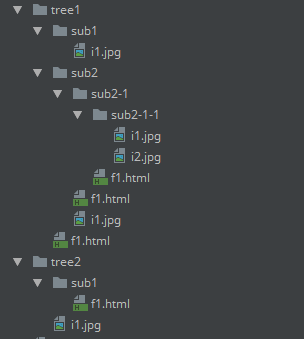
Initially, I selected the top level of the folder and then it's enough to build a model for CheckboxTree using recursion. But there are problems there is a choice like this:
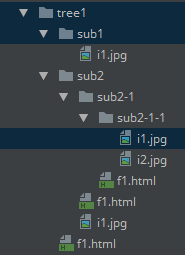
Or even more complicated, like this
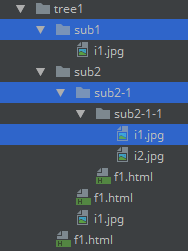
There are a lot of problems: for each received VirtualFile [] it is necessary to receive parents and descendants, and also duplication.
So I decided to rely on the file paths in VFS:
--------
VirtualFile[] files = e.getData(CommonDataKeys.VIRTUAL_FILE_ARRAY);
List<VirtualFile> imageFiles = new ArrayList<>();
List<VirtualFile> uniqueImageFiles = new ArrayList<>();
// Filtering
for (VirtualFile file : files) {
VfsUtil.visitChildrenRecursively(file, new VirtualFileVisitor() {
@Override
public boolean visitFile(@NotNull VirtualFile file) {
if (file.isInLocalFileSystem() && allowedExtensions.contains(file.getExtension())) {
imageFiles.add(file);
}
return file.isInLocalFileSystem() && file.isDirectory();
}
});
}
// Clear duplicate
for (VirtualFile file : imageFiles) {
if (!uniqueImageFiles.contains(file)) {
uniqueImageFiles.add(file);
}
}
--------
So in uniqueImageFiles, I have everything I need (including children as image files). For each VirtualFile, I execute:
--------
for (VirtualFile file : uniqueImageFiles) {
// Getting a relative path without the file itself
String relativePath = file.getParent().getPath().replace(project.getBasePath(), "");
relativePath = StringUtils.strip(relativePath, "/");
// Explode path-string to segments
String[] pathSegments = relativePath.split("\\/", -1);
buildTreeBranch(pathSegments, file, parentNode);
}
---------
Thus, I build a model for CheckboxTree easily and simply, keeping the whole structure completely.
But I'm worried about some questions:
1. How many safe pieces of code (file always image):
---------
Project project = ProjectManager.getInstance().GetOpenProjects()[0];
String relativePath = file.getParent().GetPath ().Replace(project.getBasePath (), "");
---------
2. Is there a simple way to get a relative path for VirtualFile?
3. I'm not sure about the correct approach
请先登录再写评论。
Every row in a Swing tree is represented by TreePath
http://docs.oracle.com/javase/tutorial/uiswing/components/tree.html
TreePath contains all ancestors of the selected nodes
http://docs.oracle.com/javase/8/docs/api/javax/swing/tree/TreePath.html
http://docs.oracle.com/javase/tutorial/uiswing/events/treeselectionlistener.html
It should not be hard to create a custom tree model from array of paths.
[a,b,c]
[a,b,d]
a
\b
\c
\d
Also you can create a custom tree renderer, which may gray out unselected nodes (a and b in example above)
plugin with a tree view – IntelliJ Platform-based IDEs Support
https://intellij-support.jetbrains.com/hc/en-us/community/posts/115000106690-plugin-with-a-tree-view
The way you're getting a project is far from being a recommended one. Use `ActionEvent.getProject()`.
For relative paths, there is `VfsUtilCore.getRelativePath(VirtualFile, VirtualFile)`.