Default theme for CLion 2017.2 is unreadable
已回答

This post is about themes that affect the colors and fonts of CLion's own UI, not schemes that affect the editor code, etc.
The default theme has strange settings for the Project Tool window. Some file name strings are black on white (for example, .txt files or .cpp files under the main directory of the project). That's OK.
Other strings, however, are black on dark blue, which is completely unreadable.
I don't see any way to change this in Preferences, and from what I've read, I don't think there *is* a way. Darcula is a bit better, but the overall dark theme is also hard to read.
请先登录再写评论。
Could you please provide us with the screenshot for the "black on dark blue" case? Thanks!
See attached: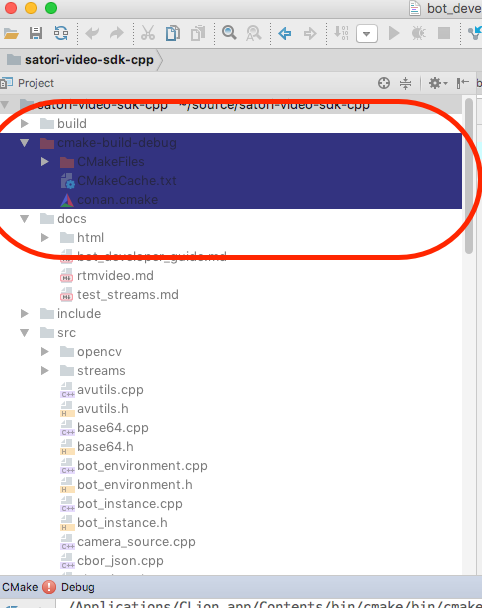
Thank you very much for the screenshot! It looks like the File Colors feature which sets different background colors for distinguishing between project files of specific scopes. But it's strange, because usually for non-project files the yellow background is set by default:
Could you please go to CLion | Preferences | Appearance and Behavior | File Colors and check what colors are specified there in your case? Additionally please try to disable the Use in Project View option and check whether dark blue background disappears in the Project View.
Also you can export your IDE settings and send them to us so that we could investigate them on our side.
Aha! Your comment helped me fix the problem. All of the options for file colors were set to some weird custom color. I fiddled with the options, and as a result the project listing is set up just as as I want.
спасибо!
I'm glad it helped! Please feel free to add a post here or contact us via "submit a request" on our support page any time you have a question related to CLion.
Пожалуйста!