WebStorm strange behavior

WebStorm 2017.2, Windows 10
Here are code sources of the simple project where you can reproduce the problem.
Inside of WebStorm I open its terminal by Alt + F12 and call the `webpack` command.

This command is to create the `./dist` directory and `module.js` file inside of it. But creates other structure:

It is the invalid result.
If I will do the same operation through the mingw console then I get nearly valid result (the source maps does not exist):
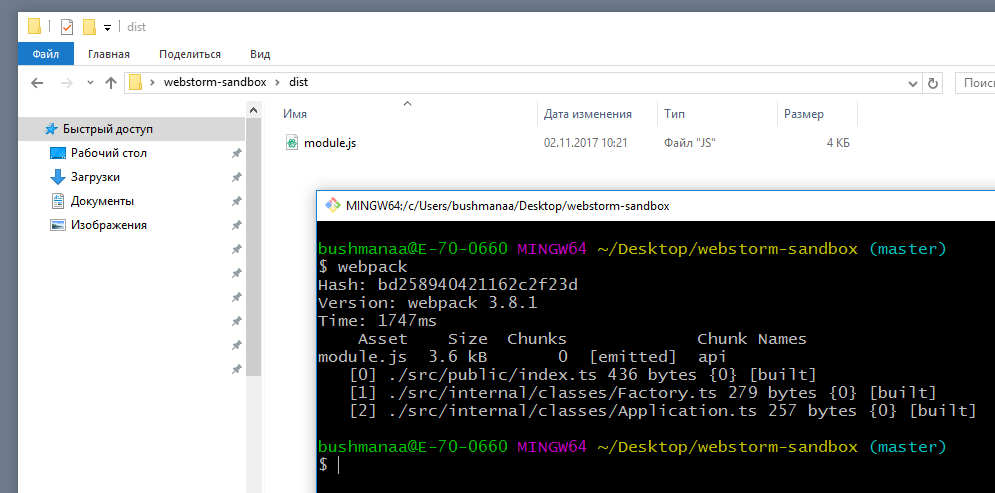
But... If after this operation I initialize WebStorm application window then it again spoils the compilation result, despite the fact that I did not call the `webpack` command in it:
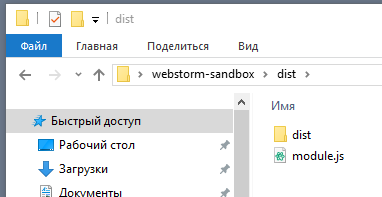
Why does it happen and how can I fix it?
This is my tsconfig.json file:
{
  "compilerOptions": {
   "experimentalDecorators": true,
    "emitDecoratorMetadata": true,
    "outDir": "./dist/",
    "sourceMap": true,
    "noImplicitAny": true,
    "module": "commonjs",
    "target": "es6",
    "allowJs": true,
    "baseUrl": "types"
  }
}
请先登录再写评论。
I solved the problem by editing ./idea/watcherTasks.xml file: I replace the row
<option name="arguments" value="$FilePathRelativeToProjectRoot$ --out-dir dist --source-maps --presets env" />
by the row
<option name="arguments" value="$FilePathRelativeToProjectRoot$ --out-dir . --source-maps --presets env" />
When I run webpack in WebStorm built-in terminal, the output is dist/module.js (as expected).
The other stuff in dist folder is created by TypeScript compiler you have enabled + Babel. Once dist/module.js is generated, the Babel compiler that is listening for changes in project .js files is triggered, generating dist/dist/module.js and dist/dist/module.js.map. Folder 'duplicating' appears because the Babel compiler replicates original folder structure in destination dir, so for the file dist/module.js dist/dist/module.js is created.
This, of course, doesn't happen if you run Webpack outside of WebStorm, but, as soon as you open the project in the IDE, the file watcher is triggered for new files, "spoiling the compilation results":)
Your setup is a complete mess. You have your ts files compiled and bundled by webpack - OK. But at the the same time you have typescript compiler, that is watching both ts and js files and emitting files + Babel compiler listening to changes in all .js files (including the ones generated with webpack and tsc!).
If you have decided to use Webpack, disable all other compilers and just use Webpack. And what's the reason for compiling ts to es6 and then using Babel for es6->es5 transformation? Why not compiling to es5 directly?
Thank you for your answers.
> But at the the same time you have typescript compiler, that is watching both ts and js files and emitting files + Babel compiler listening to changes in all .js files (including the ones generated with webpack and tsc!).
Where I have it and how can I fix it?
> And what's the reason for compiling ts to es6 and then using Babel for es6->es5 transformation? Why not compiling to es5 directly?
I don't need to use es5. I need to use es6. I don't see Babel using in my settings (gulpfile.js, karma.konf.ts, tsconfig.json, webpack.config.json). Where do you see I use it and how can I fix it?
>Where I have it and how can I fix it?
In Settings | Languages & Frameworks | TypeScript, Enable Typescript Compiler is turned on; you need to clear this checkbox
> I don't see Babel using in my settings (gulpfile.js, karma.konf.ts, tsconfig.json, webpack.config.json). Where do you see I use it and how can I fix it?
You have babel file watcher enabled - it watches all your project .js files and compiles them
Thank you very much!