Unable to run IDEA2017.2.6 on Window 10

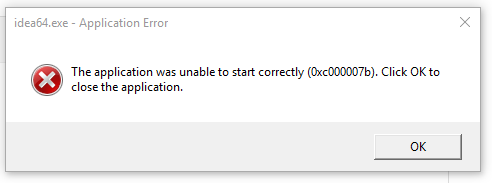
I get the error in the screenshot below "The application was unable to start correctly (0xc000007b). Click OK to run close the program. I opened idea64.exe with a dependency walker and it references many .dlls that are not found. Upon searching google for the error message I came across the link below. Is IDEA referencing these dlls directly? According to the article, those could change at any time.
I have tried the 32 bit version, reinstalling, installing earlier versions and still get the same error. I have also tried starting the program in compatibility mode, and restoring to a previous point in Windows 10. Nothing is working. I also have tried reinstalling some of the 'Visual C++ Redistributable for Visual Studio' packages which apparently contain these dlls, this also has not worked.
请先登录再写评论。
See if running using idea.bat works.
Also try a different Java version (Oracle): https://intellij-support.jetbrains.com/hc/articles/206544879 .
Check with 2017.3 release as well: http://www.jetbrains.com/idea/download/index.html .
idea.bat works. Thank you.
Issue might be caused by ASLR feature: https://blogs.msdn.microsoft.com/winsdk/2009/11/30/how-to-disable-address-space-layout-randomization-aslr/
Turning off ASLR in Windows Defender settings helped in my case. Thanks.
Please make IDEA ASLR compatible.
https://blogs.technet.microsoft.com/srd/2017/11/21/clarifying-the-behavior-of-mandatory-aslr/
Please follow this issue for updates: https://youtrack.jetbrains.com/issue/IDEA-184029
This still affects me in 2018.2. I disabled Mandatory ASL and Bottom Up ASLR and now IntelliJ Ultimate works.