2017.3: The C compiler "C:/cygwin/bin/gcc.exe" is not able to compile a simple test program.
已回答

I try move from MinGW to CygWin, but it's took all my day, because CLion and bundled CMake don't saw compiler!
I install according to this example CygWin: https://www.jetbrains.com/help/clion/quick-tutorial-on-configuring-clion-on-windows.html. Here is what the result has:
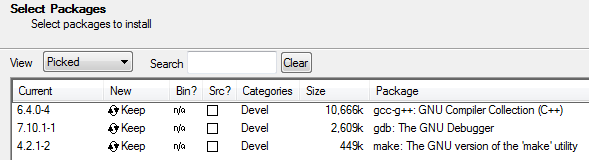
But CLion does not see this:

I take this errors: https://pastebin.com/jRfEN47y
What I do wrong? I need CygWin for normal std::thread support (MinGW-w64 don't have them - crashes during simple program).
请先登录再写评论。
I solved problem: cygwin1.dll was in the folder c:\windows. The way to successful compile project is remove cygwin1.dll from windows folder. But now I should to put cygwin1.dll into folder with my_program.exe. BUT! I can't put it in the cmake-build-debug or any cmake-folder: confuse are repeated. I have to move my compiled program to other folder and to this folder I should put cygwin1.dll.
This way to run program can't be simplify?
Hi!
Do I understand correctly that you've installed a 32-bit version of Cygwin? Why cygwin1.dll is in the "c:\windows" folder? In my 64-bit installation cygwin1.dll is located in "C:\cygwin64\bin" (and compilers are successful detected in Toolchains page in CLion). Could you please try moving cygwin1.dll to "C:\cygwin\bin"? If it doesn't help, please try uninstalling Cygwin and installing the 64-bit version of Cygwin from this web-site.
> Do I understand correctly that you've installed a 32-bit version of Cygwin?
No, I setup cygwin from setup-x86_64.exe, so it's 64-bit version.
> Why cygwin1.dll is in the "c:\windows" folder?
Because it's standard practice while for program requires dll that is not registred in system (not found in PATH?). I just put it in C:\Windows in the hope that everything will work, but I would not write this topic if it's true. I removed cygwin1.dll from C:\Windows and successful compile main.cpp with CLion, but launch this program from the build-folder is not possible, because my program don't see cygwin1.dll and I forced move program to own folder where there is cygwin1.dll. In turn cygwin1.dll I copied from cygwin/bin.
Can I run my program directly from the build-fulder without moving it forcefully to folder where cygwin1.dll is?
@Lzuz, thanks for the response. Looks like I've finally got it: if cygwin1.dll is located in "C:\cygwin\bin" like it should be after the Cygwin installation, CLion successfully detects compilers and the project builds fine; but when you try to run the resulting executable outside CLion, you get the "cygwin1.dll wasn't found" error.
I've reproduced the situation, but it's not a CLion's bug.
Adding "C:\cygwin\bin" to my system path as described, for example, here (instead of coping it to "C:\Windows") solved the problem for me: after that I was able to run the executable outside CLion ("Run as administrator").
Wow, that's worked! Thank you very much. In my tryes I received error message from CMake which something looks like this: "sh.exe was found in your path" and I thought that the directory cygwin/bin must not be present in PATH. Now I can successfully compile and run my program. Thank!