no inlay hint for java implicit type

Hi,
I have the same problem as https://intellij-support.jetbrains.com/hc/en-us/community/posts/12092378409618-Java-variable-type-hint-not-showing-for-var-types : I want to see the inferred type. But I don't have this option that's mentioned there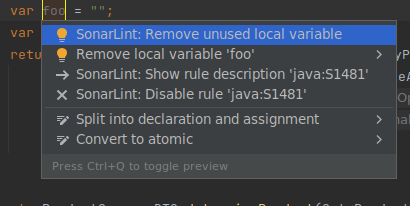 But I enabled Editor - General - Inlay Hints - Types - Java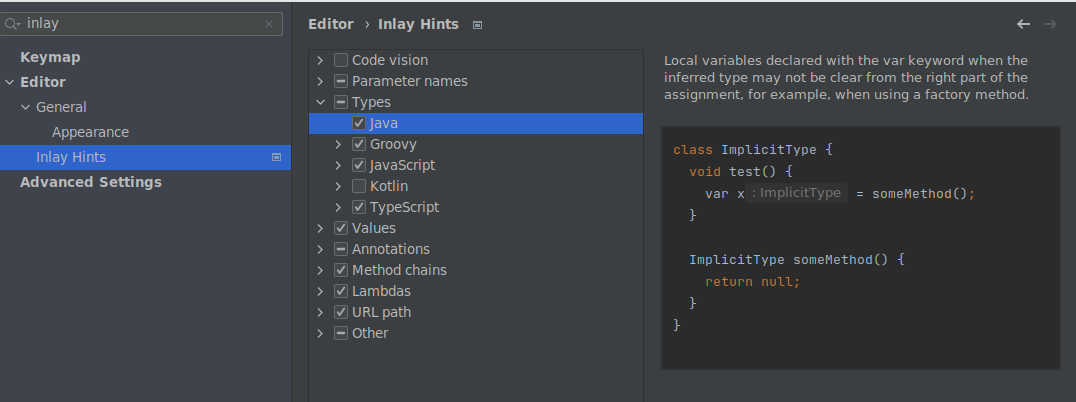
That's exactly what I want but it's not shown. What to do now?
My spec is
IntelliJ IDEA 2023.2 (Ultimate Edition)
Build #IU-232.8660.185, built on July 26, 2023
Licensed to Unite Services GmbH & Co. KG / Stephan Praetsch
Subscription is active until December 2, 2023.
Runtime version: 17.0.7+7-b1000.6 amd64
VM: OpenJDK 64-Bit Server VM by JetBrains s.r.o.
Linux 5.15.90.1-microsoft-standard-wsl2
GC: G1 Young Generation, G1 Old Generation
Memory: 4012M
Cores: 24
Non-Bundled Plugins:
Key Promoter X (2023.2.0)
MavenRunHelper (4.23.222.2964.0)
PlantUML integration (6.3.0-IJ2023.2)
uk.co.ben-gibson.remote.repository.mapper (4.3.5)
org.sonarlint.idea (8.5.1.75093)
Kotlin: 232-1.9.0-IJ8660.185
Current Desktop: Undefined
请先登录再写评论。
Hello Stephan Praetsch. Could you please check if the problem persists if you disable all third-party plugins?
Yup, it's the case with and without plugins.
Btw seems like only the local created variables don't have the inlay. That's fine because in the same line they are created
It works now (with and without) plugins for `a()`. Don't know if I overlooked this before or a restart (of the system) or the deactivation of all plugins fixed something.
Nevertheless right now my issue is solved :-)
Thank you for the update, I'm glad the inlay hints work correctly now.
Please, feel free to contact us if you have any further questions or requests.