PyCharm MacOS Sonoma toolbar not working

My configuration:
PyCharm 2023.2.3 (Community Edition)Build #PC-232.10072.31, built on October 12, 2023Runtime version: 17.0.8.1+0 aarch64VM: OpenJDK 64-Bit Server VM by HomebrewmacOS 14.0GC: G1 Young Generation, G1 Old GenerationMemory: 2048MCores: 8Metal Rendering is ONNon-Bundled Plugins: com.markskelton.one-dark-theme (5.9.0) Key Promoter X (2023.2.0) IdeaVIM (2.5.1) com.github.copilot (1.3.2.3479) izhangzhihao.rainbow.brackets (2023.3.6)
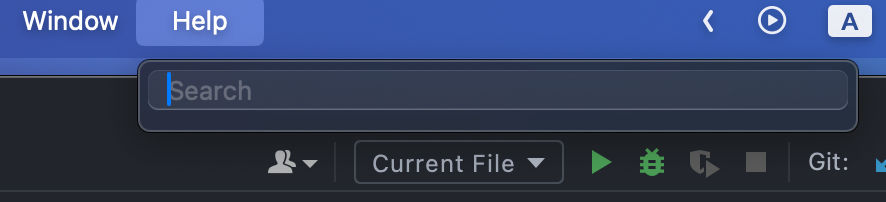
I used OpenJDK Runtime instead of native JetBrains JDK because native JDK was laggy for me. Native MacOS toolbar worked fine, but editor window was like 15FPS, while OpenJDK is smooth though MacOS toolbar (where you can see apple icon, file, edit etc.) shows nothing in each tab. It is obvious on “Help” tab, there is only search bar but not a bunch of options, like “About” or “Search action”. Here is the screenshot:
请先登录再写评论。
Changing runtime is not recommended as it may cause unexpected issues.
Please switch runtime back and create a separate issue on YouTrack regarding the performance problem: https://youtrack.jetbrains.com/issues/PY