A̵I̵ ̵A̵s̵s̵i̵s̵t̵a̵n̵t̵ ̵a̵p̵p̵e̵a̵r̵s̵ ̵a̵c̵t̵i̵v̵e̵ ̵w̵i̵t̵h̵o̵u̵t̵ ̵r̵e̵g̵i̵s̵t̵r̵a̵t̵i̵o̵n̵, Machine Learning-Assisted Completion is hallucinating attrs and not honouring tab-completion selection

[Update] This is a separate feature from AI Assistant, but still buggy.
----------
Hello.
I am not using the AI Assistant, I have not clicked to link it to my JetBrains account, and it does not show as active on the AI Assistant panel.
And yet, I am seeing clear generative AI hallucinations in my tab-completions. Attributes which do not exist at all, but which feature words similar to other words in nearby code, are being suggested. Similarly, attributes from other objects are being suggested on objects which do not have that attribute. I even got a somewhat-useful doc-comment suggestion.
Also, I've noticed that tab-completion no longer appears to use what I select from the drop-down, instead it just taking its own (often hallucinated) guess (recording of that attached: Upload id: 2023_12_11_pNJmuRWUPU6vnob7DDCE3d (file: Screencast from 2023-12-11 12-15-06.webm)
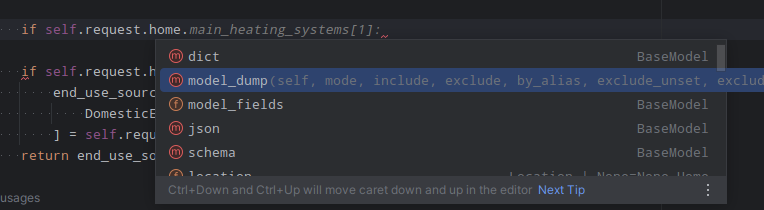
Please, please, take this paid-for “feature” away from me, I have not paid extra for it, I do not want it, and it is making me question why I'm paying for PyCharm…
PyCharm 2023.3 (Professional Edition)
Build #PY-233.11799.259, built on December 3, 2023
Runtime version: 17.0.9+7-b1087.7 amd64
VM: OpenJDK 64-Bit Server VM by JetBrains s.r.o.请先登录再写评论。
Oh, and I also put a
.noaifile in my project as the FAQ suggested, and still see this behaviour, both the hallucinations and the auto-complete selection.OK, looks like there's 2 ML features added recently:
AI Assistant(paid for full Copilot style thing)Machine Learning-Assisted Completion(standard feature, runs locally, controlled in main settings)I've disabled that and now it's no longer hallucinating attributes and it's letting my choose my own tab completion.
Turning that on by default without an opt-in wasn't helpful, and I would still say that both the hallucinations and the tab-completion are still bugs that need fixing for that feature to even be considered usable by someone who wants it.
Hi, Dev Anubis!
Apologies for the inconvenience. I created an issue on your request: PY-65255. Please vote for it and feel free to comment.
Hi! You can turn off Full Line and AI Assistant in the settings or hover the inline completion and change the shortcut from Tab to right arrow for example, or also turn off this feature. We are trying to solve the problem of hallucinations. If you have an example of what kind of autocompletion was offered to you and the classes/functions that you actually have, we would be able to solve this problem
Thanks for the responses!
Here's a minimal example where the ML auto-completion gets confused with properties from different classes in scope:
And here's an example of where it completely hallucinates properties which do not exist at all in my code base:
It's proposed
cooling_systemspresumably because ourHomeclass has a lot of attrs to do withheatingin their names, and those words come up together regularly.It's done that for both suggesting an assignment, and in completing an `if` condition. Admitedly for the latter I had to prompt it somewhat with
elif home.cbut as you can see in the screenshot, we have a propertyconstruction_datewhich the AI ignored in favour of it's hallucination.The assignment suggestion I can almost of understand, although it's sloppy for modern python to assign new attrs outside of the class/__init__. But suggesting it in an `if` is a straight up hallucination.
Thank you so much for the detailed report! Can you please check if you have an interpreter configured? Seems like if the interpreter is not configured, then we show inline autocompletion and do not perform any validation of the code

Hi , sorry for the late reply.
Yes I have an interpreter configured in PyCharm when this occurs.
(Python 3.11 from a local
.venvif it's relevant)It's strange that such incorrect completions are being shown. Can you please write one of those completions in the code and see if PyCharm highlights that code as invalid in yellow? If PyCharm highlights it, then we should also detect it. Locally, this is happening for me and your example is not reproducible. If it's not too much trouble for you, sending me the idea.log would be appreciated as it will help me reproduce the issue
Hi, sorry for the late reply, busy end of the year!
PyChrm does indeed highlight the auto-completed code as invalid once applied:
Prompt:
After tabbing to apply the suggestion:
It's interesting that since I last did it it's also now just suggesting
if outer_thing.somethingand missing the:where previously it did add the:in the ML suggestion…Build #PY-233.11799.298, built on December 12, 2023