Syntax hightlighting and code analysis don't work correctly in blade files

Hi, I'm using the IDE to work in a laravel project and currently I am facing a problem with syntax hightlighting and code analysis.
<script src="{{ asset('js/select2.min.js') }}"></script>
The previous code line works as intended after loading the page, but the code anaylisis and syntax go crazy after using the blade echo syntax inside a js script. I don't believe this should be a problem at all. I mostly use it to insert routes and the alternative would be to use the complete route instead of the name which is not ideal at all.
The following are examples of the behavior inside the code: 
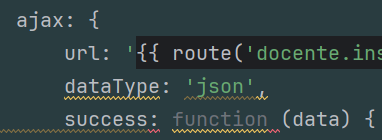
Any feedback is welcome and thanks in advance.
请先登录再写评论。
Hi there,
The behaviour/what you are seeing seems to be correct.
The IDE injects JavaScript language inside sections named “javascript”. The same for CSS in sections named “css”. This works in Blade as well as Twig template files.
I'm sure that you will agree with me that "<script …" is NOT JavaScript but HTML…
Possible solutions:
1. Use more appropriate “scripts” or alike name instead of “javascript”. And use “javascript” only when using the actual JavaScript there (as if inside the
.jsfile).2. Disable such automatic JavaScript injection at “Settings/Preferences | Editor | Language Injections”. Those rules should be at the top – they start with “blade”.
NOTE that this will affect the whole IDE (all projects). Plus, it's common to use sections named “javascript” to contain the actual JavaScript code and not script tags (these injection rules were created from user requests in the first place).
Therefore overall it's better to stick to #1, unless you cannot change the name of the section or do not care about this “compatibility” / “inconvenience for other people working on this project later” issue at all.