How do I stop IntelliJ from updating Project.xml?
已回答

I work in a large project, and for some reason, `.idea/codeStyles/Project.xml` is part of version control. Now, any time I save (any file), the editor goes ahead and removes all settings relating to the Kotlin language from this file. I can't seem to get around this and it is driving me nuts.
How do I figure out what is going on so that I can stop this from happening?
请先登录再写评论。
Hi,
Could you please share a copy of your `.idea/codeStyles/Project.xml` before and after the change? So we could check what might be wrong there.
You can upload it here https://uploads.jetbrains.com/ and share us the upload id.
I am not sure I understand. That link asks me to sign in with an @jetbrains.com email address.
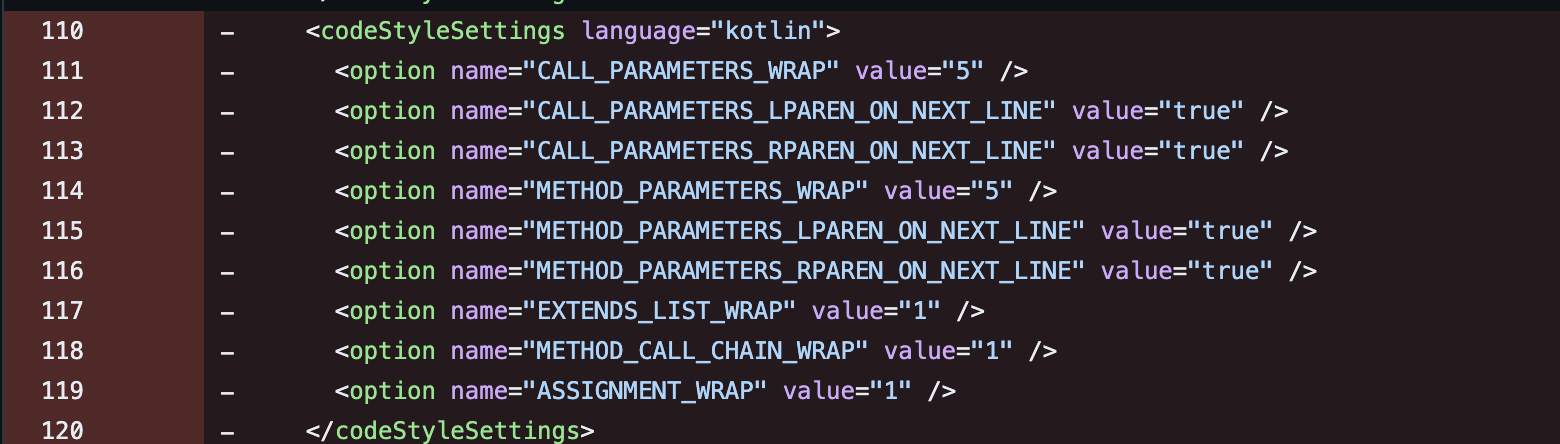
I can share that this is what lines my editor removes though:
Is there really not a single person on this planet who can help me figure out why this software is severely damaging my workflows and makes it very complicated for me to work in my collaborative environment?
@Christofer Sorry, I shared a wrong link. I meant https://uploads.jetbrains.com/.
Do you use the IDEA 2024.1 version? If you are using this version, I think you should be affected by this issue: https://youtrack.jetbrains.com/issue/IDEA-348081/2024.1-keeps-deleting-project-settings-if-these-settings-are-using-the-default-value
Yes I am using 2024.1 so it seems likely I am hit with this bug, indeed. Is the recommendation to downgrade to 2023.3.5 until further notice?
But sure, I can upload the files!
Upload ID 2024_03_19_28tFkJViuqxgRxfKyqksTz
Or you could ignore these code style changes without commiting to Git repo. The IDEA 2024.1 uses these code styles by default so you should get the same code style even if these code style entries are deleted in your local.
I have already raised the priority of this issue to the major and asked the team to see if we could address this issue soon.