Enabled new terminal but still old
已回答

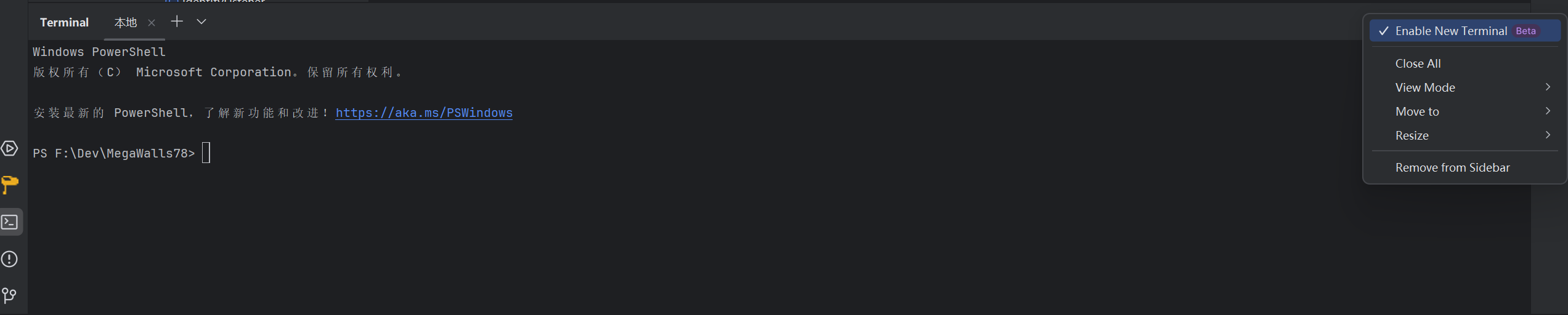
i tried re toggle, restart idea, restart my pc. but it still is old terminal.
when it first appear, im using 2024.1.3 and regular coding, suddenly terminal to old from new, after i update ide to 2024.1.4 and tried i mentioned, all no work
请先登录再写评论。
Hello, Kevin557557.
Could you please collect (
Help | Collect Logs and Diagnostic Data) and share the IDE logs? You can do it via the JetBrains Uploads service and write the ID you receive here. I want to check if any related exceptions are reported there.Upload id: 2024_06_25_yKEvdZwSupmEP7oCoqZNJq (file: idea-logs-20240625-09282514954930104417078516.zip)
And I finally reinstalled idea today and now new term is work
Thank you for sharing the logs.
In the logs, I found the only exception that look relevant to your case:
Since the terminal is working now, could you please check if the mentioned file
D:\JetBrains\IntelliJ IDEA Ultimate\plugins\terminal\shell-integrations\powershell\powershell-integration.ps1is presented on your PC?yes
Kevin557557
New terminal will be shown the same as old one in case that the used shell integration is missing. According to the exceptions from your log file, it looks like the PowerShell integration was missing and most probably this is the reason the new terminal was not working. After re-install of the IDE, the integration is not missing anymore and the new terminal is working as expected.