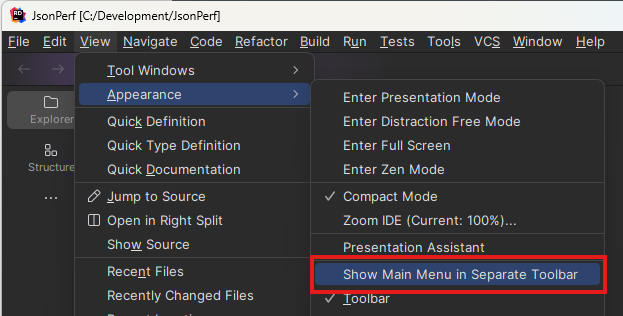
Rider 2024.4.1 Turning off "Show Main Menu in Separate Toolbar" does not work
已回答

I have disabled all plugins, unchecked “Settings | Appearance & Behavior | New UI” and restarted, then checked “Settings | Appearance & Behavior | New UI” and restarted, and ensured that “Show Main Menu in Separate Toolbar” is unchecked, and main menu continues to show in its own separate toolbar.
请先登录再写评论。
1. Please go to your IDE "About" screen, click the "Copy & close" button, and send the result to me.
2. Do you use Windows? If yes, than do you use WSL?
3. Do you use Linux? If yes, please specify your Linux version, Window manager (Gnome, KDE, etc), and if you have Wayland or x11 (echo $XDG_SESSION_TYPE).
1. Response:
2. I use Windows. I do NOT use WSL.
3. I do NOT use Linux.
Issue Rider 2024.4.1 Turning off "Show Main Menu in Separate Toolbar" does not work : RIDER-115535 (jetbrains.com) logged for this as well.
Please try disabling all non-bundled plugins and let us know if that solved the issue.
I already noted that in my original steps. Disabling all plugins did not help.
Do you use Remote connection, or any type of virtualization? If yes, please specify the client name or VM name.
I do not use Remote Desktop or virtualization. This is running directly on my dev workstation.
Let me attach logs with all plugins disabled.
I have uploaded both sets of logs here: https://1drv.ms/f/s!An8ySbcc-VC2g_pIm_MpgFVK8bwXag?e=XCcVWy
Logs with all plugins enabled: rider-logs-20240805-07235412822029644835413117-all-plugins-enabled.zip
Logs with all plugins disabled: rider-logs-20240806-0723281938741201418330121-all-plugins-disabled.zip
1. Will you still see the issue?
2. Please share the saved settings with us