How do you prevent removal of auto indents? - SOLVED

Is there a way to prevent PyCharm from removing the auto indents?
Current PyCharm version : 1.1
Build: #PY-101.8
I like to space out my code with blank lines between sections. When I hit enter on a blank line in the middle of a construct, it inserts the auto indentation based on my current settings. Upon typing, it does what I expected.


However, once the file is saved, PyCharm seems to remove the auto indents from my code. (note: it does sometimes seem to leave tabs I've type manually, but not always. I haven't figured out the pattern)
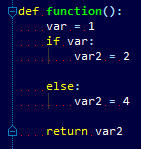
This is problematic if I ever do a copy/paste of a code section into Python command line interpreter because it views the blank lines instead of lines with space or tabs in them. I've tried using tabs and spaces for indents.
How can I prevent PyCharm from removing the auto indents? Please tell me it's not some burried setting that I'm just missing.
Attachment(s):
tabsettings.jpg
whitespace_before_save.jpg
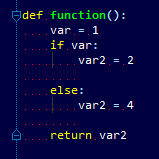
whitespace_after_save.jpg
请先登录再写评论。
Hello Marcel,
You can prevent PyCharm from removing trailing whitespace (which includes
indentation on empty lines) using Settings | Editor | Strip trailing spaces
on Save. However, I don't understand why you would want to do that, because
indents on empty lines are not signficant from the point of view of the Python
language.
--
Dmitry Jemerov
Development Lead
JetBrains, Inc.
http://www.jetbrains.com/
"Develop with Pleasure!"
I found it. It did not immediately pop out at me.
Attachment(s):
strip_trailing_space.jpg
It may be a silly thing, but I will sometimes try out snippets of code in the command line interpreter. A good example would be trying out a function. When I copy and paste a function with blank lines in the middle, the command line input sees that as the end of the continuation. However, if there are spaces or tabs on those blank lines, the interpreter treats the line like any other line with actual code on it.
so this:
doesn't end up pasting as this:
>>> def function():
... if dostuff:
... print 'something'
...
>>> else:
>>> print 'nothing'
Hello Marcel,
This reminds me of a feature that is available for some other languages and
seems to be useful to implement in PyCharm as well:
http://youtrack.jetbrains.net/issue/PY-2633
>>>> def function():
>>>>
>>>> else:
>>>> print 'nothing'
--
Dmitry Jemerov
Development Lead
JetBrains, Inc.
http://www.jetbrains.com/
"Develop with Pleasure!"
"However, I don't understand why you would want to do that, because
indents on empty lines are not signficant from the point of view of the Python
language."
Well that's clearly not true from the point of view of python interactive sessions :-)
It's reassuring to know I'm not alone with this complaint!
Can we get a fix for this behaviour?
This is very useful for me for one simple reason. Developing as a team, other team developers may or may not use the same IDE. Sometimes I may want to add a print statement to see the output of that code in the console, or add to/modify that code. I then undo and/or save that code and pycharm strips out indentations from empty lines. The version control software picks up these changes (which aren't really changes) and its impossible to revert these in pycharm! The only option is to edit the file in another IDE or text editor or tell the version control software to ignore that file, which isn't great.
It's certainly possible to revert a file which has whitespace-only changes using the Changes view in PyCharm.