Developing gem files don't show up in file search

I'm using RubyMine to develop an internal gem. When I open file search box (ctrl+shift+n, command+shift+n), my source files doesn't show up for choose. Only specs files show up.
Also when I'm on a spec file, the short key to go to the matching source file doesn't work, but it works the other way around (From source file to spec file).
I notice that the top-level directory of this source file is marked as (library home), not sure it's related.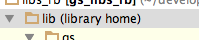
Any idea how to fix this?
请先登录再写评论。
If the gem source is marked as library root then the files under it are not treated as source.
What project structure do you have?
Oleg.
Thanks for the quick response.
I think it's quite standard gem project structure. Assuming that the gem's name is aa
aa/
Also sometimes I use this gem directly in the rails projects by modifying my rails projects Gemfile.
From:
gem 'aa', git: 'private-gem-repo.git'
To:
gem 'aa', path: '../path-to-aa/'
Not sure this caused the issue.
Is there a manual way to unmark that?
Hi,
if you will find a way to reproduce the problem please conside filing a bug.
To change settings you can try to go to Settings|Project Structure
Hope this helps, Oleg.