Debug supported for ruby 1.8.7?

I am running the EAP #1421 release of rubymine on max OS X 10.5.8 (Leopard). I would like to know if debugging is supported for ruby version 1.8.7. When I right click on a unit test and select debug I get the below message. 
These are my installed gems for ruby debug.
gem list -l ruby
*** LOCAL GEMS ***
ruby-debug-base (0.10.3)
ruby-debug-ide (0.4.9, 0.4.6)
ruby-openid (2.1.7, 2.1.6)
rubygems-update (1.3.5)
rubynode (0.1.5)
Everything runs perfectly if I use the ruby 1.8.6 interpreter.
请先登录再写评论。
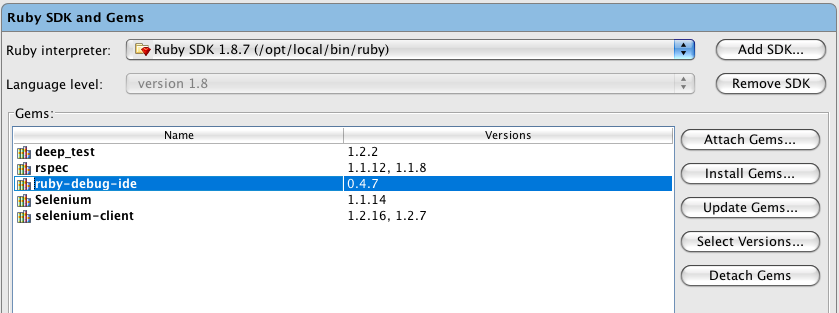
Downgrade ruby-debug-ide to 0.4.7
I attached ruby-debug-ide 0.4.7 and attempted to debug but received the same error. The error shows ruby-debug-base 0.10.3 is the problem. Would changing ruby-debug-ide fix ruby-debug-base?
Hello ssims,
I just want to mention that it is not nescessary to attach ruby-debug-ide gem to your project to enable debugging.
Gems attached are used for language codeinsight support and attaching ruby-debug-ide is useless from this point.
You only must have it installed.
Regards,
Oleg
Scott,
Attached gems affect only RubyMine code insight features and aren't related to run-time behaviour. Please completely uninstall ruby-debug-ide 0.4.9, 0.4.8
I was able to get this working successfully. I uninstalled and reinstalled with sudo, ruby-debug-base and ruby-debug-ide. I then got an error on a gem called linecache, I uninstalled and reinstalled it also. I did all of the gem management after I upgraded my IDE ot the Rubymine 2.0 Beta release. Thank you for the help!
Working installed gems with sudo:
ruby-debug-base (0.10.3)
Author: Kent Sibilev
Rubyforge: http://rubyforge.org/projects/ruby-debug
Homepage: http://rubyforge.org/projects/ruby-debug/
Installed at: /opt/local/lib/ruby/gems/1.8
Fast Ruby debugger - core component
ruby-debug-ide (0.4.9)
Author: Markus Barchfeld, Martin Krauskopf
Rubyforge: http://rubyforge.org/projects/debug-commons
Homepage: http://rubyforge.org/projects/debug-commons/
Installed at: /Users/ssims/.gem/ruby/1.8/gems
IDE interface for ruby-debug.
linecache (0.43)
Author: R. Bernstein
Rubyforge: http://rubyforge.org/projects/rocky-hacks
Homepage: http://rubyforge.org/projects/rocky-hacks/linecache
Installed at: /opt/local/lib/ruby/gems/1.8
Read file with caching
Thanks for the workaround!
Hello,
I have followed all of these steps for the work around. Unfortunately on my machine I am getting the following error.
/opt/local/lib/ruby/gems/1.8/gems/ruby-debug-ide-0.4.9/lib/ruby-debug/xml_printer.rb:107: [BUG] Bus Error
ruby 1.8.7 (2009-06-12 patchlevel 174) [i686-darwin9]
I have installed the following gems as sudo.
linecache (0.43)
ruby-debug-base (0.10.3)
ruby-debug-ide (0.4.9)
I am using Rubymine 2.0 Build RM 91.15 on a MacBook Pro.
Any thoughts?
Thanks,
Carl
Hi Carl,
Could you please launch RubyMine with -Druby.debug.output=true Java VM option enabled?
On MacOS you should add property in /Applications/RubyMine 2.0/Contets/Info.plist file. E.g.
If you have MacOS Developers Tools (XCode) installed on your Mac, you may edit *.plist files with 'Property List Editor.app'.
And attach console output here?
Thanks Oleg! I worked with Scott Sims and we were able to find the root cause on my machine. I had rspec installed locally and not as root (sudo).
We removed rspec and reinstalled as sudo.
That seemed to resolve the issue and I am free again to develop code!
Carl
Glad to hear, thanks for the solution! It seems like a common problem when rubygems doesn't find clashes between locally and globally installed gems.
You're a genius!
By installing the following gem versions (on Ubuntu 10.04), and RubyMine 3.1.1, I am able to debug my 1.8.7 Rails app:
gem "linecache", "0.43"
gem "ruby-debug-base", "0.10.3"
gem "ruby-debug-ide", "0.4.9"
I put those lines in my Gemfile, ran "bundle", and life is good!
Without doing this manually, RubyMine tries to install later versions of these gems, that are incompatible with Ruby 1.8.7.
Thanks.