Thanks for the reply and the image. I don't see the option to switch to or remove when I roll over a task. I see the switch to task drop down, and can switch by clicking on a task, but I don't see any option to remove on roll over.
Are there plans to improve the usability of managing tasks? I'm currently evaluating switching to RubyMine from Eclipse + Aptana plugin. I use Mylin in Eclipse heavily and prefer its usability over RubyMine's tasks.
The expectation of deleting items would be via right-click -> delete or the delete button. Also, I should be able to rename tasks.
I'd just like to add that so far I'm really enjoying using RubyMine. I'm still in the evaluation phase but almost certainly going to buy. Compared to Eclipse / Aptana, RubyMine doesn't have the vast plugin support, but for specifically developing Ruby on Rails projects, it's an order of magnitude better. I can't tell you enough how refreshing it is to see code completion that works (really well)!

Using tasks combobox on ToolBar
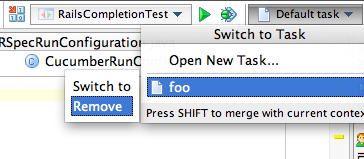
P.S: Probably at first you need to show toolbar - see RubyMine|View|Toolbar
Roman,
Thanks for the reply and the image. I don't see the option to switch to or remove when I roll over a task. I see the switch to task drop down, and can switch by clicking on a task, but I don't see any option to remove on roll over.
There is a submenu, please press "right arrow"
Are there plans to improve the usability of managing tasks? I'm currently evaluating switching to RubyMine from Eclipse + Aptana plugin. I use Mylin in Eclipse heavily and prefer its usability over RubyMine's tasks.
The expectation of deleting items would be via right-click -> delete or the delete button. Also, I should be able to rename tasks.
Looks like "right arrow" instead of right click is also convenient. Am I wrong?
Good idea, I've filed an issue - http://youtrack.jetbrains.net/issue/IDEA-66839. Please vote and track issue status.
Thanks, voted and watching.
I'd just like to add that so far I'm really enjoying using RubyMine. I'm still in the evaluation phase but almost certainly going to buy. Compared to Eclipse / Aptana, RubyMine doesn't have the vast plugin support, but for specifically developing Ruby on Rails projects, it's an order of magnitude better. I can't tell you enough how refreshing it is to see code completion that works (really well)!
Thank you for warm words about RubyMine, develop with pleasure!