Cucumber step snippets

The navigation through scenarios is very comfortable. A click on an undefined step displays the corresponding code snipppet. Unfortunately the keywords in the snippets are duplicated like this:
Then /^Then she should be at the 'users\/new' page$/ do
pending
end
I'd rather expect:
Then /^she should be at the 'users\/new' page$/ do
pending
end
Hubert
请先登录再写评论。
Hello Hubert,
I suppose you see in in console, right? It's Cucumber's output and their bug.

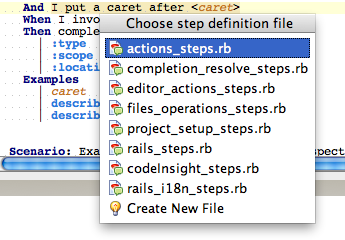
Do you know about our Quick fix for creating step definitions?
1. Just press Alt+Enter on undefined step
2. Select "Create Step Definition"
3. And choose step definition file
Hi Roman,
yes, in the console. I'm not sure about the origin of this keyword duplication since I get the correct snippets from cucumber itself outside of RubyMine (using the terminal). For example:
You can implement step definitions for undefined steps with these snippets:
When /^she goes to \/signup$/ do
pending
end
[...]
Thanks for the tip!
Hubert,
Thanks, I will check it. Our cucumber formatter uses cucumber api for creating these snippets, probably smth changed.
Update: I've fixed it, fix will be available in next EAP
I am not getting that "Choose Step Definition File" pop up. I am using IntelliJ Ultimate 2017.3 Version... Can you give us steps what makes it come?? in our company some people are getting that pop up but not me... what am I missing??
I have already created a step Definition file under src/java/stepdefinition... Let me know if you need any further information.
As per your Step 3 in above I am NOT Getting that.