The result is the same: the build is uninstalled. Regular uninstall shows a couple of pages with uninstalled build path and a question to delete user settings and caches.
Where can I find this uninstaller? You can choose to uninstall multiple versions? Doesn't seem like the same one in "C:\Program Files (x86)\JetBrains\IntelliJ IDEA x.x.x\bin\Uninstall.exe"
Is there a way that I can uninstall previous versions with the silent deployment parameters? Now I use ideaIU-14.1.3.exe /S , but this keeps the previous versions installed.
I had to run a custom setup like this for a simple IntelliJ deployment:
Yes I use that command already. But I have to do this for EACH installed version of IntelliJ. But thanks for the responds, I already figured the silent installers don't have many options :)
Yes. You are right. The option is not implemented separated from gui mode yet. I can just suggest you to create new issue for this case (youtrack.jetbrains.com).

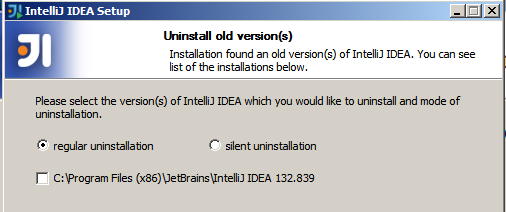
The result is the same: the build is uninstalled. Regular uninstall shows a couple of pages with uninstalled build path and a question to delete user settings and caches.
Regards,
Alexander.
Where can I find this uninstaller? You can choose to uninstall multiple versions?
Doesn't seem like the same one in "C:\Program Files (x86)\JetBrains\IntelliJ IDEA x.x.x\bin\Uninstall.exe"
It is one of pages shown by installer when you install a new build. Then it suggests to uninstall previous builds. Now the page has different UI.
Regards,
Alexander.
Is there a way that I can uninstall previous versions with the silent deployment parameters?

Now I use ideaIU-14.1.3.exe /S , but this keeps the previous versions installed.
I had to run a custom setup like this for a simple IntelliJ deployment:
You could delete installed IDEA in silent mode as follows:
"C:\Program Files (x86)\JetBrains\IntelliJ IDEA 14.1\bin\uninstall.exe" /S
Just please make sure that you run the command with admin rights
Yes I use that command already. But I have to do this for EACH installed version of IntelliJ.
But thanks for the responds, I already figured the silent installers don't have many options :)
You could uninstall silently old(previous) version(s) during install of new version. See the image.

It is an interesting option, but I don't think there are silent install parameters available for this.
I would like to do what you do (in your screenshot) without using a wizard.
Yes. You are right. The option is not implemented separated from gui mode yet. I can just suggest you to create new issue for this case (youtrack.jetbrains.com).