Setup multi-module maven/tomcat project.

Hi all!
Guys, i have a problem), i came from eclipseIDE, and cant start work properly in idea, cause, i cant understand how to control my project)
Description of my problem: We have a multi module project. structure like this: SuperProject(with kernel pom.xml, but without any sources. just documentation, scripts and etc.) and in this folder another project SUBProject(have src, and another pom.xml that dependence from root pom.xml in SuperProject). Here screenshot of my workplace: http://www.flickr.com/photos/63952505@N04/7821845952/lightbox/ , u see - upsa - main-root project, and i work with workload .
Now - i cant configure tomcat properly(i can't debug, for example, simple dont stop at breakpoints...) to deploy my(workload) project. How i can target to tomcat(i had install tomcat local and want run locale) to run artifact from upsa/workload/target folder? Now its run from upsa/target . and i have problem eith this, cause, if for example i change xml file, and run again my app, it dont change it real! And another big problem - i cant debug my app, it simple dont stop at breakpoint. i setup application server like in examples, just set home directory.
I would appreciate, if u can help me, because Idea - very-very cool after eclipse, but u see, a have a problems... tnx!
请先登录再写评论。
Are you running Tomcat:![]() on the left side of the debug tool window (or run tool window).
on the left side of the debug tool window (or run tool window).
1) via an IntelliJ IDEA run/debug configuration?
2) Externally?
If you are doing option 1, you should be getting breakpoints (assuming you launch Tomcat using the "Debug" icon (Shift+F9)). After making code changes, in order to get those changes to take, you need to refresh the deployment using the "Refresh Deployment Status" button
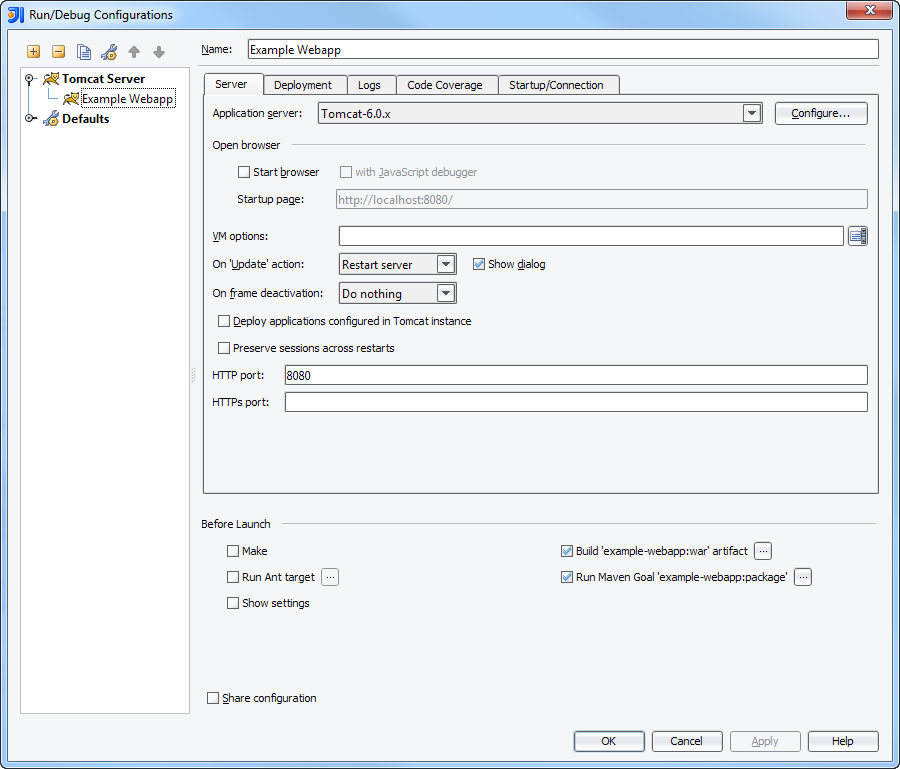
Here's an example Tomcat Run/Debug Configuration:
If you are using option 2, debugging and refreshing will not work directly from IDEA. You would need to configure a 'remote' Tomcat run/debug configuration for debugging. And would need to manage refreshing the deployment via a script or such.
ok, thnx. But i want to deploy my app from Idea, and start tomcat from idea.
First - how i can target rigth WAR file(for example project/target/project.war) and want tha Idea build it and then deploy it, not make different classes folders and files in project on upper folder(my project nested from parent)
Second - how exactly refresh after changes(classes refreash good, but not xml from resources)
And last - is it real to debug webbapp without remote connect? cause i read a lot about problems with it.
Thank you!
PS - maybe i should attach screenshots of my project structure and configs?
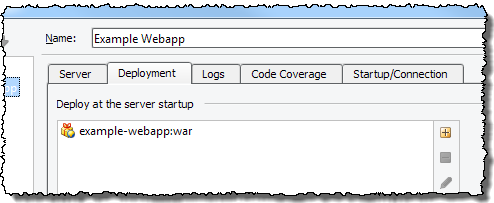
The screenshots I show above are for a Tomcat run/debug configuration that allows you to run and deploy your web application from within IDEA. To create one:
The war file is specified in the run/debug configuration (see step 4.3 above). When IDEA imports a maven based project, it sets it's Make settings to mimic the settings in your maven POM, including the build directories it uses. So by default, the artifact definitions will be to the maven artifacts. If you go to File > Project Structure (Ctrl+Alt+Shift+S) and look on the "Artifacts" pane, you will see a definition for the WAR file and the Exploded WAR file. If you select one, you will see that the "Output Directory" is to the target directory. Assuming that in step 4.8 of the above instructions you set "Make" as the "Before Launch" option, an updated version of the project will be deployed when you run Tomcat. Typically selecting "Make" is a faster option. IDEA tracks files that have changed and only compiles those that have changed. The only time you would want or need to use "Run Maven goal 'package'" as the "Before Launch" option is if your maven build is configured to do some additional processing such as token replacements.
On the run or debug tool window, there is a "Refresh Deployment Status" button![]() . Clicking it will refresh the application. How it does that is set in the You can set how via the "On 'Update' action" option in the Run/Debug Configuration (Step 4.9 above). There is also the option to "Show dialog". When that is selected, a dialog will open when you click the "Refresh Deployment Status" button. You can then change the methodology used each time you refresh.
. Clicking it will refresh the application. How it does that is set in the You can set how via the "On 'Update' action" option in the Run/Debug Configuration (Step 4.9 above). There is also the option to "Show dialog". When that is selected, a dialog will open when you click the "Refresh Deployment Status" button. You can then change the methodology used each time you refresh.
You may have to select the "restart server" option, or at least the "redeploy" option. Tomcat itself (or a framework you are using) may cache files & resources, or it may not recognized updates to certain configuration files. As a result, the "update resources" and the "update classes and resources" may not work correctly. I typically use the restart or redeploy options just to ensure everything refreshes. I only use the "update classes and resources" when I'm working on a very specific item that I know is updated properly and need rapid redeployment cycles. I never use the update options if I have changed a configuration file (and especially the web.xml file). I like to be absolutely sure everything is reinitialized fresh. I recommend you start with "restart server" and ensure that everything updates properly. Once you are sure that that is working, try the "redeploy" option. Then try the update options.
I've been using both local and remote debugging with Tomcat in IDEA almost daily for the past 8 or 9 years. I've never had issues. It has always worked smoothly. Currently I work on a project that has four different web applications/services. I deploy all four locally and debug between them. (For example I'll have breakpoints in the UI web application and the other service web service applications the UI calls.) More than a dozen coworkers have all had the same positive experience. We've had a number of people migrate from Eclipse to IDEA solely because of how easy it is to deploy and debug a web service in IDEA. So I'm not sure what "problems" people might be referring to in your reading. If you have some specifics, let us know. There is likely an easy resolution.
The one potential gotcha is whether you have your breakpoint set to Suspend all threads (the default) of just the active thread. If all threads are suspended, it might cause timeout issues in other code. Also if it is a shared server, and others try to access it, they will not get to it if you are at a breakpoint with all threads suspended.
There is more information in the tutorial at: http://wiki.jetbrains.net/intellij/Creating_a_simple_Web_application_and_deploying_it_to_Tomcat It's not based on a maven project, but everything applies. Also search the Help guide for Tomcat.
Thank you vary mach for this answer, its very usefull!
Now i have no problem to deploy my new resources files, tnx )
Buuut, still cant connect and debug app, here sreenshots:
Im using tomcat 5.5, run my Intellij Idea on kubuntu12.04(GNU/Linux), and as u can see we are using SSL.
U also see the problem (on last two image). this happend when a i try use this https://127.0.0.1:44591 (as debug port).
In my system i use only JAVA_HOME variable (others(like $CATALINA_HOME, $CATALINA_BASE) i think, setting in starting catalina.sh)
WHAT can i do in this case?
And, u said that u dont khow about problems, here:
Thank you for all!
I try to setup tomcat 6 and deploy app.... and IT'S work! really!
Now we have a problem, and i think i must report a bug, maybe? Or its a problem only of tomcat? btw, with the same instance of tomcat eclipse work fine.
That's mean - Intellij Idea have a minor bug =)