Editor Colors : trouble with dark background (regexp and todo's)

Dear all,
I'm switching from idea 5 to 8 keeping my custom dark background editor setting.
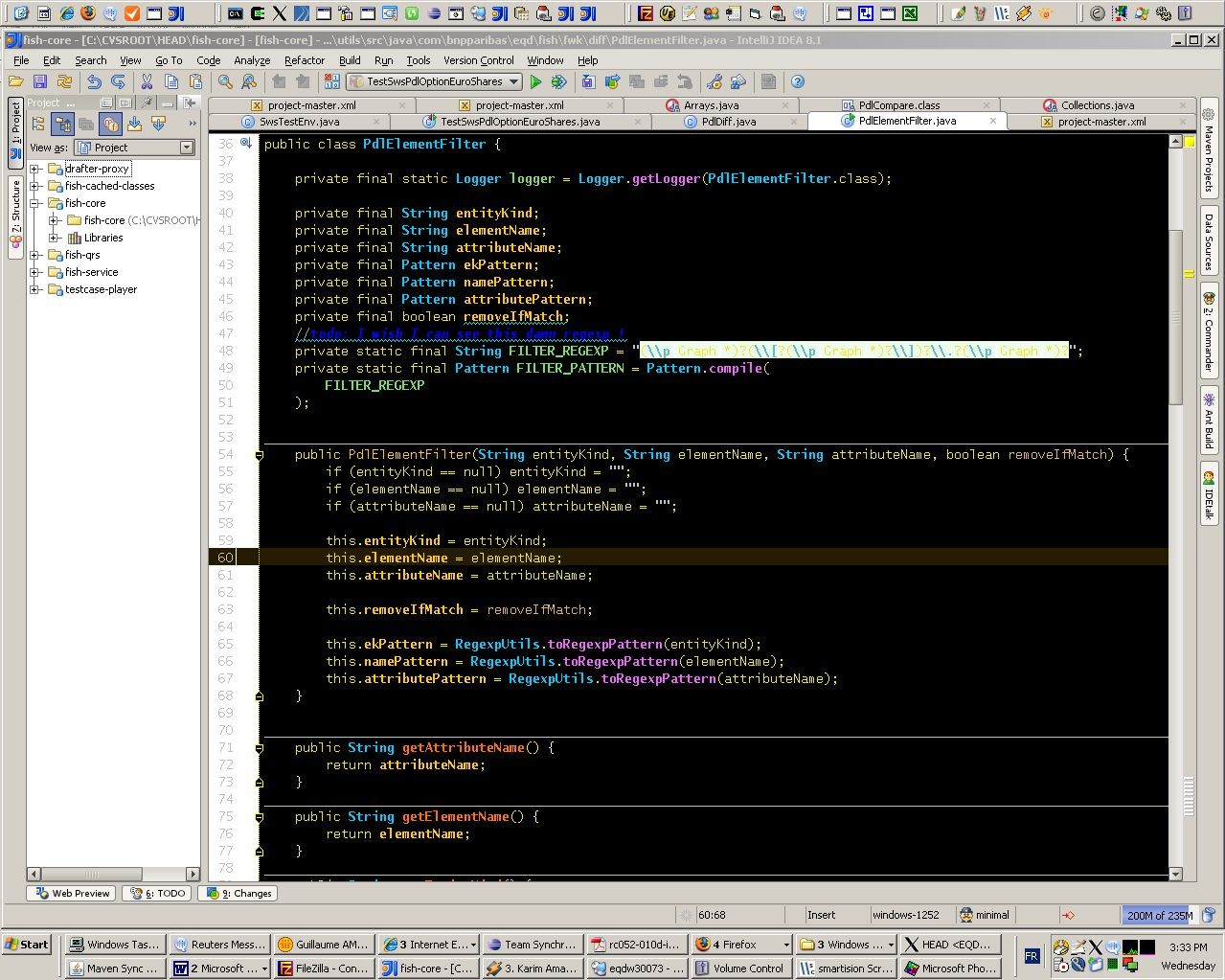
I can't find the setting for the regexp highlighting. In previous version it was treated as a regular String. But now regexp are detected and have their own color scheme...
With my dark bg theme, I have them in yellow over a white background...
Please have a look to the attached screenshot to see how its look.
Anyone knows how to set the background for the regexp (or at least to disable the regexp detection) ???
By the way, if someone knows how to change the color scheme of the 'todo' keyword, I'll appreciate a lot: currently I have it darkblue on black...
Thanks a lot.
Attachment(s):
idea8darkbgTroubles.jpg
请先登录再写评论。
guillaume ame wrote:
Hi Guillaume,
I had the same problem, I think you'll find it's the setting for the
injected language fragment.
For todos you customize their colour thru the TODO section - edit each
todo pattern.
Regards,
A fellow dark bg coder :)
To change the TODO colours (or add additional TODO markers), go to Settings
-> IDE Settings -> TODO and then create or edit the pattern of interest.
Thanks a lot for your quick and helpfull hint !