PHPStorm 10 - New bar in distraction free mode

Hi, there.
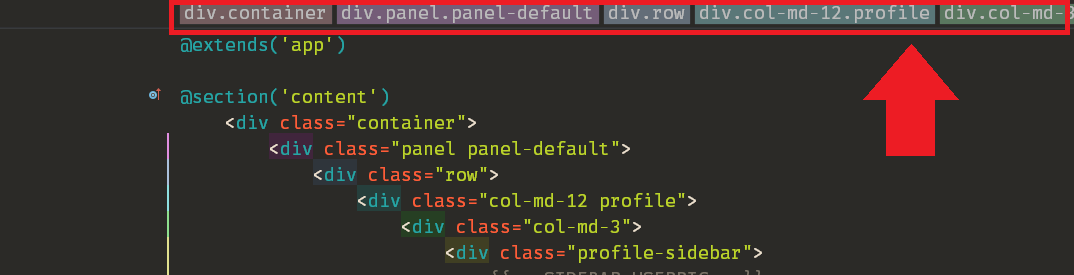
I just upgraded to PHPStorm 10. In general, it is working well, but I noticed there is now a bar at the top of the screen in "Distraction Free" mode. This bar seems context-based. For example, in an HTML file, it shows HTML breadcrumbs. I searched the menus a bit and I can't find a way to hide this bar (I prefer my distraction free mode to be, erm, distraction free). I have attached a screenshot that shows this bar when viewing an HTML file. Note that the bar remains even when it isn't showing information, such as when viewing a PHP file.
Does anyone know how to hide it? Thanks.
Attachment(s):
Bar.png
请先登录再写评论。
Hi there,
This is a standard bar (part of the actual editor area) -- it makes sense to have it there.
In any case: please try "Settings/Preferences | Editor | General | Appearance --> Show Breadcrumbs" (P.S. restarting project/IDE may be required)
Hi, Andriy.
I saw that setting and tried setting that but it doesn't hide that bar in Distraction Free mode (only in normal mode).
Thanks for your suggestion.
Works fine for me (tested on latest EAP + v10 final) on Windows 7 using HTMl file (you got Blade I guess).
Suggestion: enter Distraction Free mode and then try to disable that option -- for me it's automatically gets disabled but maybe it somehow got stuck for you.
Thanks for your recommendation! That fixed it. I didn't know Distraction Free mode had it's own set of settings. Thanks again!