Make sure that 'JSDoc comment matches function signature' inspection (Settings/Inspections/General) is enabled Note that the quickfix will only be proposed if you have JSDoc tags that don't match you function signature. So
/** * some comment */ var a = function(ento){
};
won't cause any violations (and thus no quickfixes will appear). But it will be shown for
/** * some comment * @param x */ var a = function(ento){
};
If you just need the JSDoc annotations being auto-generated for your function, enter /** before it and hit return
I think I found the issue. The 'Update JSDoc' marker on the lightbulb only appears when the cursor is positioned on the offending word. For instance:
If my cursor was on the 'tmp4' before clicking on the orange lightbulb, then I get the correct options: Otherwise if my cursor was anywhere else in the comments (even on the @param), I get nothing: I also get nothing for added arguments: In this case, I need to have my cursor on the 'tmp9' argument to get the option.
Additionally, I can't seem to find 'Update JSDoc Comment' anywhere in the keymap section? In webstorm 6, I had a hotkey that would simply update everything about the jsdoc comment and it worked perfectly. That's mostly the functionality I am after. Just click 'ctrl-something' and the jsdoc gets up to date (without erasing or having to move my existng comments, which is what happens if I re-regenerate everything using /**).
Thank you so much, this is exactly what I was looking for!
While I'm at it, I can't seem to have the 'Align object properties: on value' do anything (in code style->javascript->other). When do the values get re-aligned? For instance, cut/pasting the following code doesn't seem to re-align anything:

Hi Mathieu,
it's called 'Update JSDoc comment'. Seems to be there - see the screenshot
Can you provide the code snippet where it doesn't appear for you?
Best regards,
Lena
Attachment(s):
updateJSDoc.png
Still can't find it. I get the following when I click on the same orange light bulb in the comments.
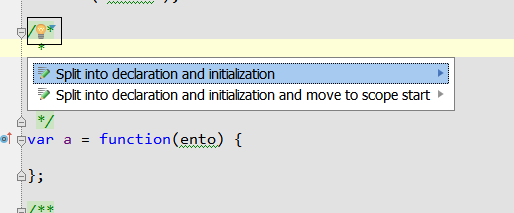
Perhaps I have some type of option turned off? I can't find the "Update JSDoc Comment" anywhere (even when trying to find it through CTRL-SHIFT-A).
M.
Make sure that 'JSDoc comment matches function signature' inspection (Settings/Inspections/General) is enabled
Note that the quickfix will only be proposed if you have JSDoc tags that don't match you function signature. So
/**
* some comment
*/
var a = function(ento){
};
won't cause any violations (and thus no quickfixes will appear). But it will be shown for
/**
* some comment
* @param x
*/
var a = function(ento){
};
If you just need the JSDoc annotations being auto-generated for your function, enter /** before it and hit return
Best regards,
Lena
I think I found the issue. The 'Update JSDoc' marker on the lightbulb only appears when the cursor is positioned on the offending word. For instance:
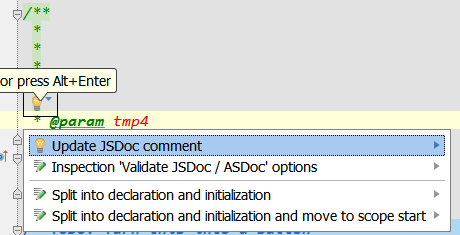
If my cursor was on the 'tmp4' before clicking on the orange lightbulb, then I get the correct options:
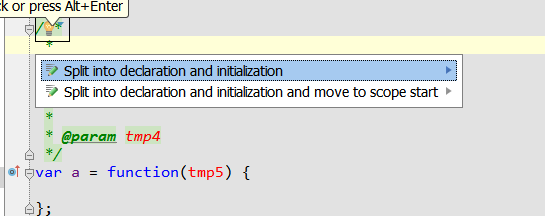
Otherwise if my cursor was anywhere else in the comments (even on the @param), I get nothing:
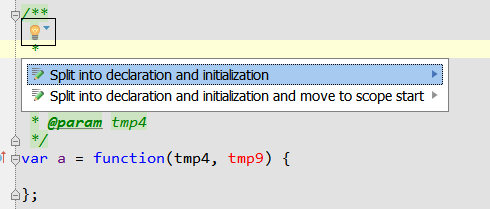
I also get nothing for added arguments:
In this case, I need to have my cursor on the 'tmp9' argument to get the option.
Additionally, I can't seem to find 'Update JSDoc Comment' anywhere in the keymap section?
In webstorm 6, I had a hotkey that would simply update everything about the jsdoc comment and it worked perfectly. That's mostly the functionality I am after. Just click 'ctrl-something' and the jsdoc gets up to date (without erasing or having to move my existng comments, which is what happens if I re-regenerate everything using /**).
M.
The action you are looking for is still available - Settings/Keymap/Other/Fix doc comment
Thank you so much, this is exactly what I was looking for!
While I'm at it, I can't seem to have the 'Align object properties: on value' do anything (in code style->javascript->other). When do the values get re-aligned? For instance, cut/pasting the following code doesn't seem to re-align anything:
var a = {
tmp: 12,
blablabla: 24
};
whereas I would except the result to be:
var a = {
tmp: 12,
blablabla: 24
};
M.
The code is formatted according to style settings on hitting ctrl+alt+L (Code | Reformat code)
Best regards,
Lena