More Build System Comfort

In my JavaScript project, I am using the build tool grunt. The current build workflow is as follows:
- Save changes in WebStorm
- Run grunt.cmd in the project directory via command line (I am on Windows)
- Refresh Web Browser
Basically I want to have a Run Configuration where I can at least run a command line script (i.e. batch file). Then the build workflow could go down to save changes and hit the run button.
So, my questions are:
- How can I run a script from WebStorm via a button/shortcut?
-
Can I also run a script when a file is saved?
This would be interesting for running unit tests only (grunt is task-based).
请先登录再写评论。
Hi there,
You can try this:
Now the workflow will be: Save file and click icon/press another shortcut.
As for the second question -- No, currently it is not possible. There should be a ticket for such request for sure -- you are not the first person who asks for such functionality -- you should be able to find it on Issue Tracker: http://youtrack.jetbrains.com/issues/
Related
Thanks, this would solve the problem if there were no specific problems with grunt. I'll keep on running it manually and wait for Yeoman to give it a try.
So far, I solved this by setting up Grunt as an External Tool. [The Parameters will be explained later.]
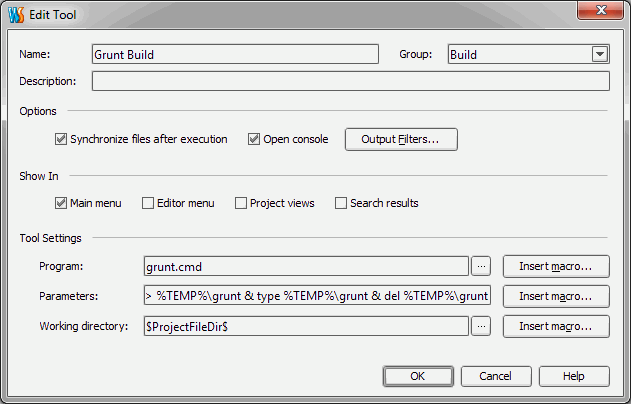
Then I added a Shortcut in my Keymap as recommended earlier by Andriy. After that, I had the issue that grunt output was cut in the console. The exit code returned earlier than the expected output was made by grunt. This is a grunt/node.js issue. Fortunately, there is a workaround by setting this as Parameters:
> %TEMP%\grunt & type %TEMP%\grunt & del %TEMP%\grunt