PhpStorm 3 -- Floating Find Window gone

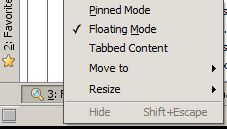
If I float my Find window in PhpStorm 3 and change my multiple monitor arrangement, it can disappear and become (permanently?) inaccessible. I can re-dock it and see it in PhpStorm's main frame/window, but I'm unable to get it viewable as a floating window again.
Any way to force it back onto my monitor?
Attachment(s):
floating.jpg
请先登录再写评论。
Hi there,
I do not have multiple monitors so cannot give you 100% working/confirmed solution, but check this file:
You may just delete that whole section (but make backup first) .. so those settings would reset, or just try fixing it by editing values (while that project is closed in PhpStorm, of course).
If that files is not right one (which I believe should be), then you may look at window.manager.xml and options.xml from you IDE-wide settings folder (on Windows 7 it would be C:\Users\USERNAME\.WebIde10\config\options)
Yep, that did it. I just blasted the line for the Find window, executed another Find, and was able to get it floating again.
Thanks!