PHPUnit Unix remote + Windows local paths

I have PHPUnit running successfully as a remote mounted configuration, but I'm wondering whether there's a way to have PhpStorm link the files in the results window and also a question about the accuracy of the report.
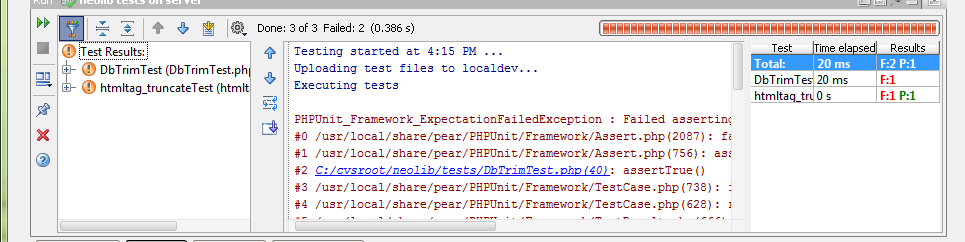
In the below picture from the Jetbrains blog post each of the files are linked, but in my situation since my local files are in c:\cvs\ and the remote files are in a Unix path such as /home/project/ what happens is the files are not linked, even though I've done some mapping. Is this a limitation or do I have to improve my mapping?
I'm also wondering about the stats returned. It seems to only show the number of tests run, is there a way to show the number of assertions passed/failed? (phpunit command line shows this)
请先登录再写评论。
Hi there,
Please provide your configuration details as well as results you are getting (what error path/link you see and what it should be) as it is not possible to see if this is a PhpStorm issue or misconfiguration on your side based on the information you have provided so far.
No, currently PhpStorm does not show this information. Please fill a Feature request on Issue Tracker: http://youtrack.jetbrains.net/issues/WI
Here is the output:
PHPUnit_Framework_ExpectationFailedException : Failed asserting that <string:The quick br...> is identical to <string:The quick b...>.
#0 /usr/local/share/pear/PHPUnit/Framework/Assert.php(2087): fail()
#1 /usr/local/share/pear/PHPUnit/Framework/Assert.php(963): assertThat()
#2 /.amd_mnt/howard/projects/neolib/tests/htmltag_truncateTest.php(34): assertSame()
#3 /usr/local/share/pear/PHPUnit/Framework/TestCase.php(738): invokeArgs()
#4 /usr/local/share/pear/PHPUnit/Framework/TestCase.php(628): runTest()
#5 /usr/local/share/pear/PHPUnit/Framework/TestResult.php(666): runBare()
#6 /usr/local/share/pear/PHPUnit/Framework/TestCase.php(576): run()
#7 /usr/local/share/pear/PHPUnit/Framework/TestSuite.php(757): run()
#8 /usr/local/share/pear/PHPUnit/Framework/TestSuite.php(733): runTest()
#9 /usr/local/share/pear/PHPUnit/TextUI/TestRunner.php(305): run()
#10 /.amd_mnt/howard/projects/neolib/tests/_intellij_phpunit_launcher.php(444): doRun()
#11 /.amd_mnt/howard/projects/neolib/tests/_intellij_phpunit_launcher.php(643): runTest()
#12 /.amd_mnt/howard/projects/neolib/tests/_intellij_phpunit_launcher.php(746): main()
Here are some screenshots:
(Using EAP 106.550)
The last screenshot (Run Configuration) -- have you tried to setup mappings on the "Remote" tab -> "Server path mappings..." button ?
I did not have anything mapped there (no Debug Server set either) so I added the below as a test and I still have the same problem.
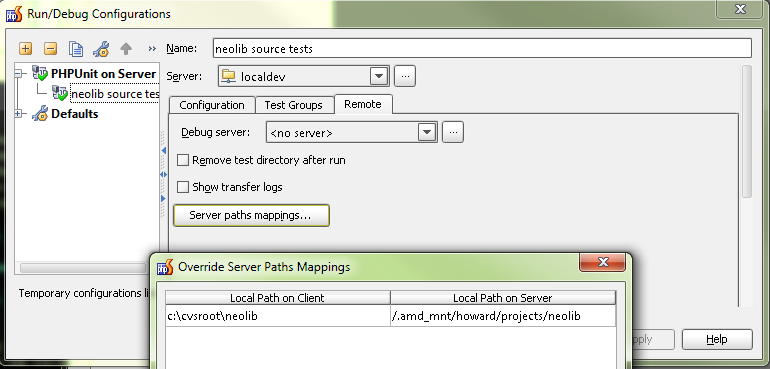
Exactly the same? I mean, taking the output you have provided, I would expect lines #2, 10, 11, 12 to have local path references...
This may not be relevant to this case (no debugging here so I'm unsure about this), but can you try & setup debug server (same "Remote" tab -- basically, it's just another mapping for debugging purposes -- at least that part) and try again.
If still no changes .. then I can only recommend submit a new ticket on Issue Tracker so it will be looked into and resolved: http://youtrack.jetbrains.net/issues/WI
Also -- please try the latest EAP build -- PS-107.21
EDIT:
Possibly you are facing this bug (or it shares the same roots): WI-4559 or WI-5559
In order to have resolution of file paths you should specify mapping for your local project folder -> Unix real project path. In your case it should be something like c:\cvs\ (local) -> /home/project/ (deployment) + web path. If that does not help, could you please enable logging for php and attach your log file to this thread. To do that follow the steps below:
Thank you.
The mappings don't help, and to answer about lines #2, 10, 11, 12 they do not change with mappings. Attached is the idea.log
I can also confirm that the mappings do not work in EAP 107.21 either.
Attachment(s):
idea.log.zip
Andriy,
FYI: This is not relevant. 'Debug server' mappings used for debugging only. (yeah, it is quite complicated and should be reworked)
Do I need to provide any more information to help figure this out? Would love to use this as intended.
Thanks
Thank you very much, we figured out what the problem is. Hopefully, that will be sorted out with 2.1 release.
Great news, thanks and glad it worked out!
This appears to be fixed in 107.94. Please ee attached screenshot. Thanks very much!