Cygwin version

Hi,
I am all new to Clion, and i am trying to start up a project. I have installed the lates version of Cygwin, but I get the following warning in the settings window:
" Environment: Cygwin; current version is 2.2.1; supported versions range is 1.7.32-2.0.x"
from the FAQ :http://blog.jetbrains.com/clion/2014/09/clion-answers-frequently-asked-questions/ I read:
- Cygwin: Get the latest available 64-bit version and make sure to select gcc/g++, cmake, make and gdb 7.8 while installing the packages.
Anyone experinced the same? Is it a problem or should I be able to continue?
Kind regards
Mads
请先登录再写评论。
Hi!
We have the issue about updating Cygwin version:
https://youtrack.jetbrains.com/issue/CPP-4306
Feel free to comment or upvote.
Hi Anna I am running Cygwin 2.2.1...how do I make this work with CLion? I don't understand the link you provided.
Anna,
Can you please tell me how to fix this? The link you provided doesn't appear to have anything.
Thanks Anna.
Hi!
You can use Cygwin 2.2.1 with CLion despite of the warning.
Hi Anna,
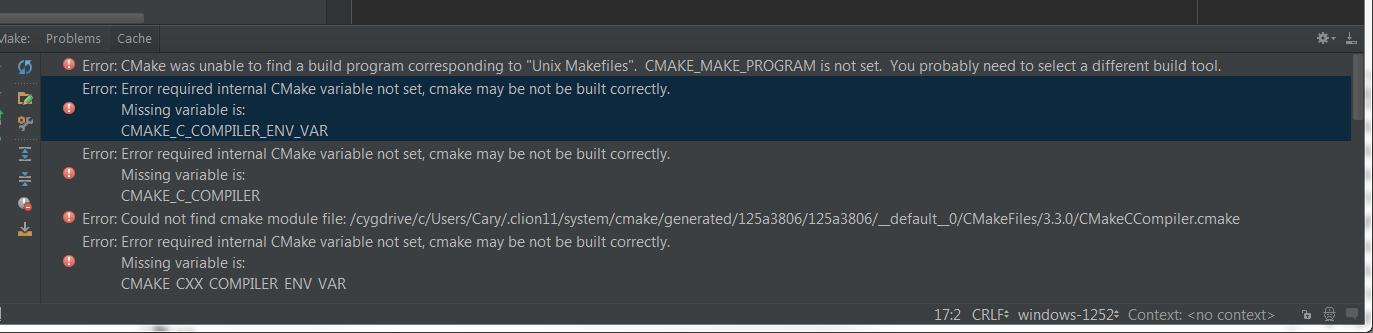
These are the error messages I'm getting...
Can you please advise how to fix this? I want to use the Clang compiler.
Thanks!
Looks like CMake can't find make utility in this case. During cygwin package installation you need to install the following components:
- make
- C and C++ compiler
- gdb
you can also find useful libraries there.
When installation will be done you can go to Settings > Build, Execution, Deployment > Toolchains and verify that paths to all components are successfully resolved by CLion.
I am having the same issue..
I tried to find an older version of Cygwin to install but have not been successful.
I have installed Make, gdb, gcc / g++, cmake
It recognizes the cmake but times out without finding othe others.
Unless they are in different locations It SHOULD work but it currently isn't.
Someone on your team should do a fresh install to see the issue.
It would be nice to also have the Clion updated to atleast let us know it is compatible with the 2.2.x series.
Rodney
Rodney,
I just downloaded and installed 2.2.1 version as usual. I attached screenshot of my toolchain setting, could you please do the same for me. Also please collect logs adding #com.jetbrains.cidr.cpp to Help->Configure Debug Log Settings. Then run the detection in the preferences once more and send us the logs (Help-> Show Log )
Attachment(s):
cygwin-2-2-1.PNG
Ok I am currently doing a new fresh install of cygwin.
With Make, Cmake, gcc / g++, gdb.
Will try again.
I did have one setting different. When I had the "Use bundled Cmake" it said it wasn't compatible so I used the second choice and told it where it was.
MAYBE that is the issue...
Rodney
Using the bundled cmake seemed to fix the issue. It now found everything.
Seems a bit buggy for my taste but should be a simple fix when clion is next updated...
Will now have to try using it for my class projects and see how it works.
Rodney
Rodney,
Could you please clarify when the issue occurs? I just tried cmake.exe installed from cygwin package and it's fine.